
Do you know what the best thing about globalization is? It allows you to consume content in your language and gaming is no different. So, in this post, we are going to see how you can change language in Xbox 360, Xbox One, and Xbox Series X/S with some simple methods. So, without wasting any let’s get started.
To change the language in Xbox 360, Xbox One and Xbox Series X/S, you need to follow different procedures. We have listed methods for each console separately below.
How to change Language in Xbox 360
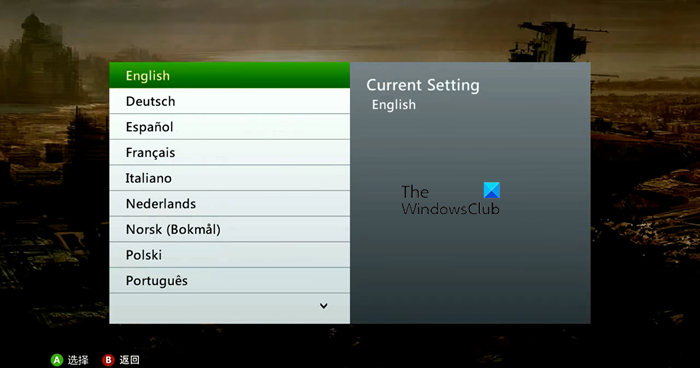
If you want to change language in Xbox 360, follow the prescribed steps.
- Open your console and go to the Settings tab.
- Now, click on Family and make sure that it’s not turned on.
- Go back and then click on System.
- Navigate to Console Settings > Language and Locale > Language.
- Select the language you want to use.
This changes your console’s language. If you want to change the location as well, click on Locale from Language and Locale option and then select a country. This should do the job for you.
How to change Language in Xbox One
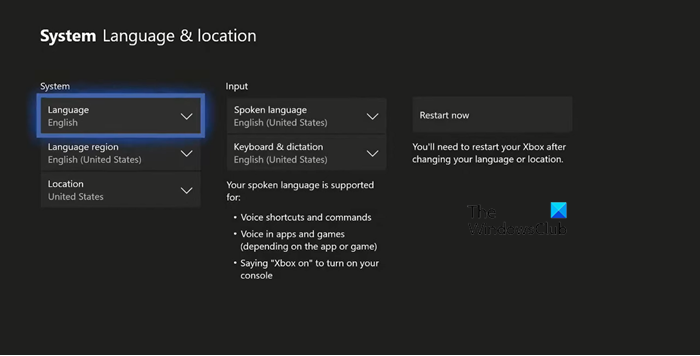
To change the language on Xbox One, follow these steps.
- Press the Xbox button on your controller.
- Move to Profile & system tab.
- Select Settings.
- Go to System > Language & location.
- Now, change whichever language of the option you want.
- After making the required changes, click on Restart now.
Once your Xbox will be restarted, the language will be changed. You can also change your location from here.
How to change Language in Xbox Serie X/S
To change the language on Xbox Series X/S, follow the steps below.
- From your Xbox UI, go to Settings (More Options).
- Go to System > Language & location.
- Now, change the language option you want.
- After changing the language, click on Restart now.
This will do the job for you.
How do I change my Xbox 360 from Arabic to English?
It is quite easy to change your language from Arabic to English. You can also change the region if you want to. Scroll up and read the guide on how to change the language on Xbox 360; it includes a complete guide to help you switch to any language you choose.
Can you change your region on Xbox Series X?
To change your region on Xbox Series X, go to Settings > System > Language & location. Then select the region you want to switch to from the Location drop-down menu. Finally, click on Restart now and your changes will be saved.
Also Read: How to set up Xbox One S Console.
