
In this post, we compare Hermes Agent, LangGraph, and AutoGen to find out which AI agent is best for Windows tasks, automation, and building custom workflows.
To improve workflow efficiency, choosing the right AI agent framework is essential. The choice often comes down to three big names for Windows developers: Hermes Agent vs LangGraph vs AutoGen. But how do we choose the one that actually works best on Windows? All of them help users automate tasks, handle complex workflows, and even let AI agents do the heavy lifting. To make it easier to decide, this guide takes a deep dive into the options.
Hermes Agent vs LangGraph vs AutoGen
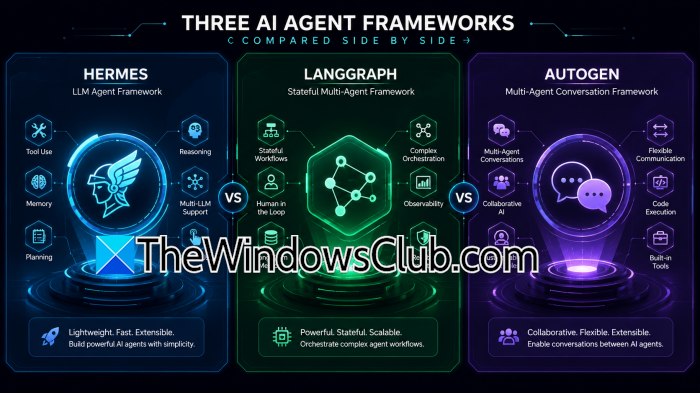
Let us start by looking at how they work, their philosophies, and how they differ, because it’s important to be clear from the start that they are not three flavors of the same thing. Hermes Agent, developed by Nous Research, is designed to act as an actual assistant that can act on your behalf. It interacts with terminals and files, uses browsers, maintains memory, runs scheduled tasks, and delegates work to other agents when needed. It also supports Windows natively without requiring WSL, Cygwin, or Docker.
On the other hand, LangGraph from LangChain takes a different approach: it is a framework for building and controlling agent workflows. Unlike Hermes Agent, LangGraph doesn’t give you a finished Windows assistant; it gives you all the components you need to build one. Here, users decide what the agent does, how it moves between tasks, and what information it remembers and when it should ask a person for approval.
Then there’s the third one, AutoGen, developed by Microsoft Research. It was designed around multi-agent applications. AutoGen lets users assign different roles to agents, which then communicate with one another to complete a task. It has been popular among developers experimenting with multi-agent systems. However, in 2026, we need to consider that Microsoft has placed AutoGen in maintenance mode and recommends the Microsoft Agent Framework for new projects.
Setup, everyday use, automation, and control are some of the parameters we will use to compare them further.
Installation and Setup
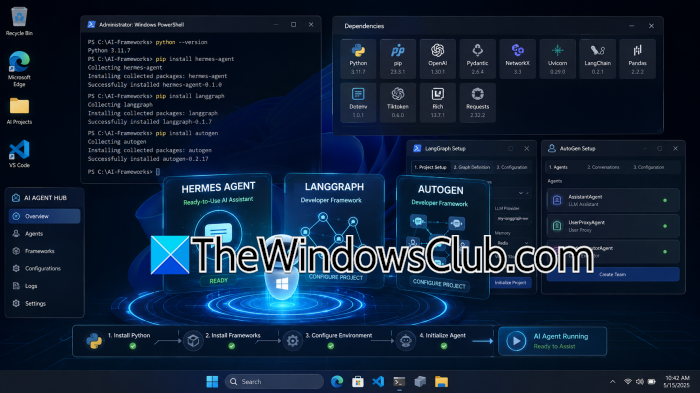
Hermes Agent has the most straightforward path for Windows users who want to start using an agent rather than develop one. You can install it through PowerShell or by downloading a desktop installer if you prefer a graphical setup. The installer handles much of the environment Hermes requires, including its Python runtime and supporting dependencies. The desktop and command-line versions also share the same underlying agent, configuration, sessions, skills, and memory. As a result, users can move between the GUI and terminal without maintaining two separate assistants.
In contrast, LangGraph is intended to be a part of a Python application. Users first need to install the package, then create a graph, define its state, connect models and tools, and lastly, decide how the workflow should behave. This, however, makes it less convenient for someone who simply wants a personal Windows automation assistant or just wants to get started. If you don’t mind extra setup in exchange for flexibility, LangGraph is a great option.
In this sense, AutoGen follows a similar developer-first model: you install it as part of a Python project and then do the work yourself. This makes AutoGen better suited for developers experimenting with agent-based applications than for someone looking for an AI assistant that is immediately ready to control. The technical barrier is reasonable for a Python developer; however, Microsoft’s decision to stop adding new features is another factor to consider.
Workflow and Compatibility
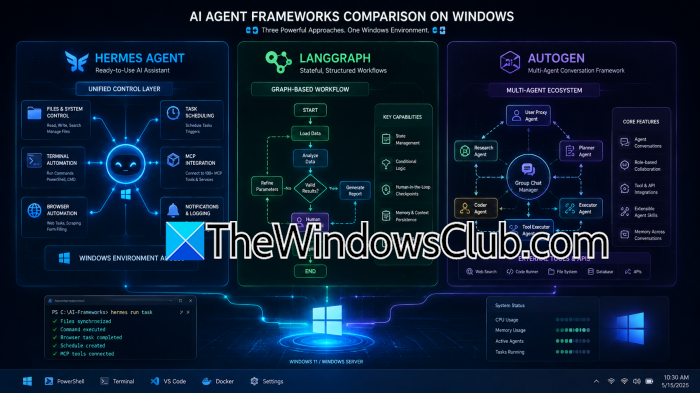
Hermes Agent has the strongest case because it is specifically built, tested, and organized for Windows. Most of its functionality runs natively on Windows. It supports the CLI, interactive TUI, browser tool, MCP servers, schedulers, messaging gateway, and web dashboard without WSL. Hermes can also register its gateway with Windows Task Scheduler so that it starts when the user logs in. However, the only caveat is that the embedded terminal inside the dashboard requires a POSIX-style pseudo-terminal and is currently WSL2-only.
LangGraph does not have a compatible native Windows feature set because it is not trying to be a Windows desktop assistant. However, this can be an advantage if the organization already has PowerShell scripts, internal APIs, databases, or Windows administration tools that users can connect to a LangGraph workflow and decide exactly how the agent should use them. Users can interrupt execution, resume it later, and introduce deterministic application code alongside model-based decisions. This makes LangGraph particularly useful when an agent becomes part of a larger application. If an AI system needs auditability and control over important operations, representing the workflow explicitly is much more valuable.
AutoGen is similarly platform-flexible because the framework itself is not tied to a particular operating system. Its usefulness on Windows depends on the application that users create using built-in Windows features. The current framework supports custom function tools as well as extensions for HTTP requests, MCP servers, GraphRAG, and other integrations. Agents can therefore retrieve information from external services or perform operations based on the model’s decisions.
User Interface and Daily Usage
Hermes Agent is most suitable for someone who wants to use an agent. Its desktop experience gives users a direct way to interact with the assistant, while the CLI and other interfaces provide alternatives for more technical workflows.
LangGraph doesn’t provide a standard user interface because it is meant to sit underneath an application. Developers can build whatever interface makes sense for their use case.
AutoGen sits between these two approaches because of AutoGen Studio. Studio provides a browser-based, low-code interface where developers can configure everything. It also displays generated artifacts and provides information about agent runs. However, Studio is primarily a prototyping environment and should not be treated as a production-ready application, as Microsoft warns.
ComparisonTable
| Feature / Dimension | Hermes Agent | LangGraph | AutoGen |
|---|---|---|---|
| Architectural Philosophy | Closed learning loop with persistent skills and memory; self-improving agent design | Directed graph orchestration (nodes = agents/tools, edges = transitions); explicit workflow control | Multi-agent conversational architecture (GroupChat, ConversableAgent patterns) |
| Memory & Learning | Four-tier memory pipeline (working, episodic, semantic, procedural); skills persist across sessions | Minimal built-in memory; relies on explicit graph state management | Limited memory persistence; focused on conversation context, not long-term skill retention |
| Fault Tolerance | Auto-recovery built-in; resilient to failures | Manual recovery required; developer must define error-handling paths | Task-level retry mechanism; less robust than Hermes |
| Cost & Latency (Benchmark 2026) | Lowest cost per task ($0.07); fastest p95 latency (1.1s) | $0.08 per task; 1.2s latency | $0.12 per task; 1.8s latency |
| Development Status | Active development by Nous Research; 40+ built-in tools, multi-platform gateway (Telegram, Slack, etc.) | Active development by LangChain Inc.; strong for production-grade workflows | Maintenance mode by Microsoft; strategic trajectory uncertain |
Verdict
- Choose Hermes Agent if you want an AI that can work directly with your Windows computer. It is the most convenient option for everyday Windows tasks, with built-in support for terminal commands, files, browser automation, memory, scheduling, and delegation.
- Choose LangGraph if you are looking to build an agent and need precise control over workflows, state, human approval, and execution.
- AutoGen is mainly worth considering for existing projects or multi-agent systems built around its architecture. It is capable, but the Microsoft Agent Framework is recommended instead since it is in maintenance mode.
Read: Best frameworks to build Multi-Agent AI program
Which agent framework is considered the best?
For Windows, the Microsoft Agent Framework (MAF) 1.0 is the top choice. It combines AutoGen and Semantic Kernel into a single, production-ready SDK with native Windows support. MAF offers enterprise-grade orchestration, .NET/Python compatibility, and deep OS integration via the Windows Agent Runtime.
Read: What is free alternatives to Manus AI agent?
What are the top agentic AI frameworks?
The top agentic AI frameworks include LangGraph for complex, stateful graph-based workflows, CrewAI for simple, role-playing team orchestration, and Microsoft Agent Framework for accessing AutoGen and Semantic Kernel in one place. Users can also choose Hermes Agent, known for its autonomous, self-evolving agents.
Also Read: Find best MCP Servers for your AI framework.
