
If you can’t load saved game data in GOG Galaxy, try this simple workaround to fix it. Usually, this issue where the Your local copy of the Game is corrupted message is seen in GOG Galaxy affects only the corresponding games or apps. Reinstalling or repairing them should resolve the issue.
Fix GOG Galaxy Your local copy of the Game is corrupted error
The GOG Galaxy game files can malfunction for a number of reasons like incomplete installation of game files or an active anti-virus software quarantining game files. So, if you have an anti-virus system enabled, you’ll need to disable it temporarily. Then, repair or re-install it and attempt to launch it again.
- Select your Game.
- Hit the Customization button
- Choose the Manage Installation option.
- Select Verify/Repair.
- Wait for the process to complete.
- Try launching the game again.
These are rare instances in which essential data is corrupted. However, fixes for them are relatively straightforward and do not require much effort.
Select the game that’s causing the issue and failing to load.
Click the Customization button (visible as the equalizer icon in the upper-right corner of the Game screen, just adjacent to the Play button).
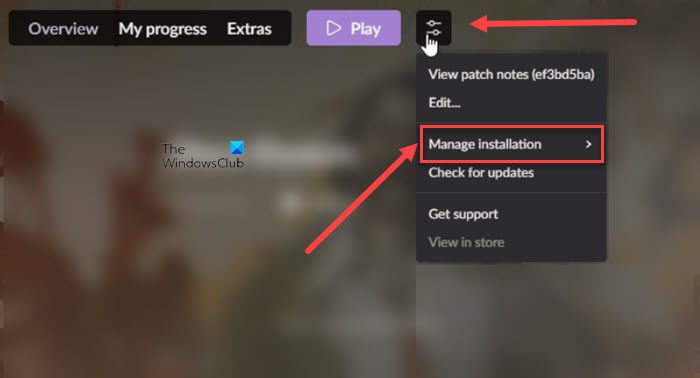
Then, from the list of options displayed, expand the Manage installation setting.
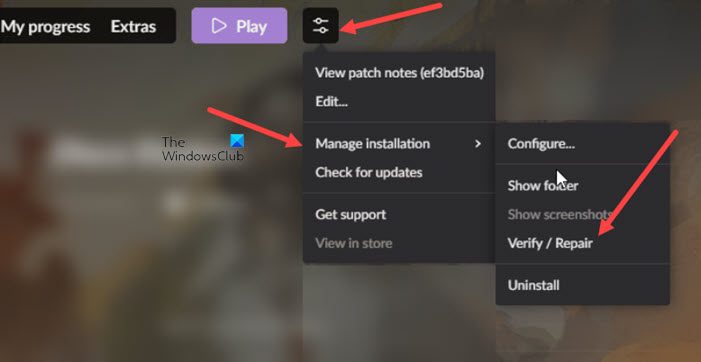
Scroll down to Verify/Repair heading and select it.
You should see an Updating notification, indicating the repair process has started. Allow GOG GALAXY to verify all your game files and compare them with those hosted on our servers. If there’s any mismatch, GOG GALAXY will redownload and repair corrupted files. The processing time may vary, depending on the number of corrupt files it has to repair.
It is also important to note that the method described above applies only to GOG games. To repair games from other platforms, you will need to use the appropriate option in the correct launcher.
Read: GOG game gone, not displaying or disappeared from GOG GALAXY.
What is a corrupted data file?
A corrupted file is one that fails to load properly or is damaged. As such, it can be any type of file, from program files to system files or certain types of documents. Also, corruption can result from system errors or malware infections. In the latter case, you’ll need to run an anti-malware program to repair, delete, or quarantine the infected file.
Can GOG Galaxy be trusted?
Yes, GOG formerly known as Good Old Games is a safe and legit site for game codes. It is a subsidiary company of CD Projekt, the maker of the beloved Witcher franchise and Cyberpunk 2077, an action role-playing video game.
