
NVIDIA GPUs have been among the best for gamers. It enables their computers to play heavy games without errors. Even though there are some unexpected errors, you can fix them easily. Some users are reporting that the game quits unexpectedly with NVIDIA GeForce error code 0x80030020. In this guide, we have a few solutions to fix it.
What is NVIDIA error code 0x80030020?
We see The game quit unexpectedly. Try playing it again message when we see the NVIDIA error code 0x800300200 while playing games.
The error can be caused due to,
- Corrupted or outdated graphics drivers
- Failed GeForce processes
- Corrupted GeForce experience files
Let’s see how we can fix the error.
Fix NVIDIA GeForce error code 0x80030020; Game quit unexpectedly
When the game you are playing quits unexpectedly and it shows NVIDIA error code 0x80030020, you can fix it in the following ways.
- Relaunch GeForce Experience
- Allow all GeForce Experience related services
- Update NVIDIA graphics driver
- Reinstall GeForce Experience
Let’s get into the details of them.
1] Relaunch GeForce Experience
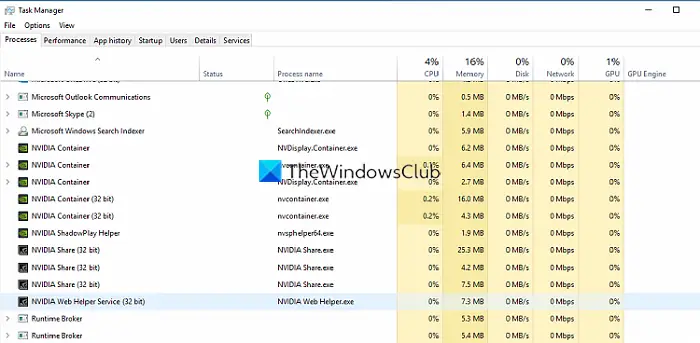
The error is caused by a disturbance in the NVIDIA GeForce Experience. You need to end all NVIDIA services and relaunch GeForce Experience. Open Task Manager and end all NVIDIA processes by right-clicking each one and selecting End task. Then, launch NVIDIA GeForce Experience and see if it has fixed the error.
2] Allow all GeForce Experience related services
GeForce Experience has many related services that are required for it to run correctly. You need to grant all related services permission to fix the issue. To do so,
- Open Run command
- Type Services.msc and press Enter
- Find NVIDIA Telemetry Container in the list of services and right-click on it
- Then, select Properties
- Click on Log On tab
- Check the button beside Allow service to interact with desktop
- Then, click on the General tab and make sure the Status is set to Running. If not set it to Running.
- Click on Apply and then OK
- Likewise, find NVIDIA Display Container LS, NVIDIA NetworkService Container, NVIDIA LocalSystem Container in the Services list and make sure they are running.
3] Update NVIDIA graphics driver
If the issue is still not fixed you need to update the NVIDIA graphics driver as the error might also be the result of corrupted or outdated graphics drivers. To update graphics drivers:
- You may check for Driver Updates via Windows Update to update your drivers
- You may visit the manufacturer’s site to download the NVIDIA graphics driver.
4] Reinstall GeForce Experience
If the error is not yet fixed, you need to uninstall GeForce Experience and reinstall it after downloading it from the official website. To uninstall GeForce Experience,
- Open Settings app
- Click on the Apps tab
- Select Apps & features
- Find GeForce Experience and click on the three-dot button beside it
- Then, select Uninstall and follow the on-screen wizard to complete removal.
After that download, GeForce Experience from the NVIDIA website and install it.
This is how to fix the NVIDIA error code 0x80030020, which causes the game you are playing to quit unexpectedly.
How to fix Game quitting unexpectedly with NVIDIA error code?
There are several ways to fix the game quitting unexpectedly due to the NVIDIA error code. You need to understand that the error is related to the NVIDIA graphics driver and GeForce Experience. To fix it you need to implement the above fixes.
Read: NVIDIA Container stopped working on Windows computer.
