
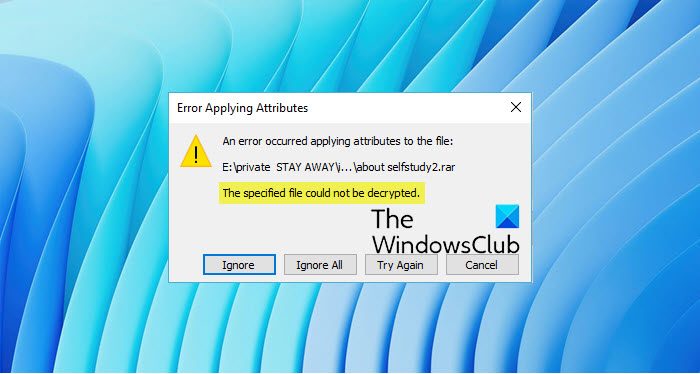
If while trying to encrypt or decrypt a file using the default EFS engine – An unexpected error is keeping you from applying properties to the file. If you continue to receive the error, you can use the error code to search for help with this problem. Error 0x80071771, The specified file could not be decrypted, then this post may be able to help you.
Cause for this error:
- Files on your drive are encrypted with EFS, but the encryption certificate/key is unavailable.
- Corrupted system files or recovery image.
- Disk errors are interfering with the reset.
- The reset process is trying to wipe encrypted files without proper decryption.
The main cause of this error is that the source file is encrypted or decrypted and not readable by the File Explorer’s copy and paste feature. It typically occurs when you access a file that was previously on another computer.
Error 0x80071771, The specified file could not be decrypted
First, see if you can decrypt the files encrypted by EFS.
If you cannot, proceed and take full control of the file. To do this, open File Explorer, right click on the Partition and click on Properties.
Under the tab labeled as Security, click on the button that says Edit… While doing that, make sure that Everyone is selected under the Group or user names section.
Now, the Permissions for Everyone section will be activated. Make sure all the checkboxes for Allow are checked. Click on Apply.
Next, click on the button called Advanced. A window named Advanced Security Settings will appear. Now, click on the Change link for the Owner section.
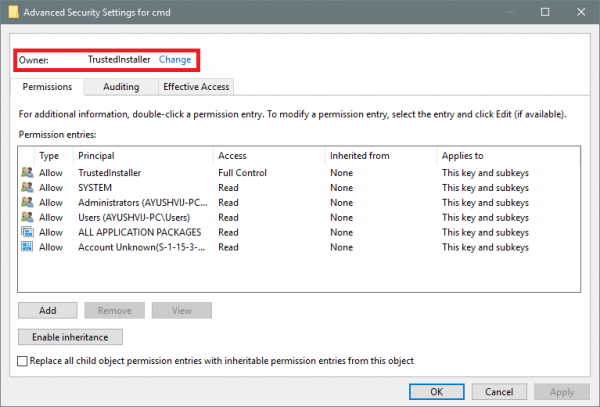
Type your account name in the field and click on Check Names to verify the account name and click OK.
Select the option that says Replace owner on subcontainers and objects. Click OK.
Having done this, now in the Group or User names list, select Administrators, and select Full Control in the Permissions for Administrators panel. Click OK.
If you intentionally encrypted files with EFS, make sure you have the encryption certificate backed up. Without it, those files may be permanently inaccessible.
This should help.
