
When you print a document in Windows, it is removed from the print queue once the printing is complete. If you need to reprint the same document, you will have to follow the print document method again. To save time, you can enable the Keep printed documents option for the printer, and keep reprinting the document.
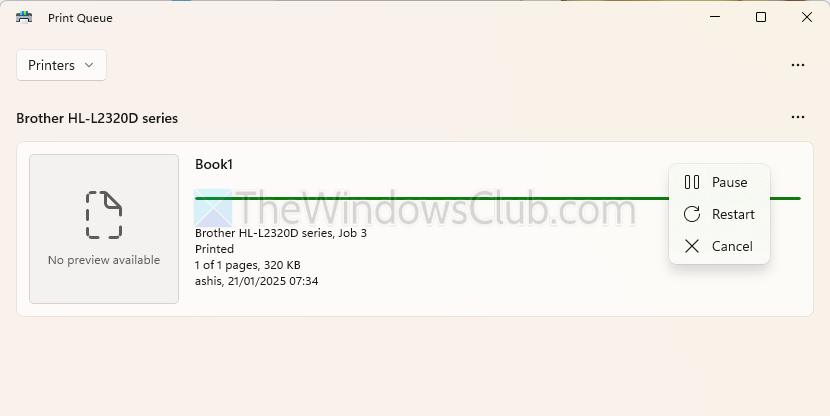
Enable Keep printed documents in the Print queue on Windows 11/10
To enable the Keep printed documents in the Print queue option you will have to open the Printer Properties. You can access this in two ways:
- Printer Settings
- Print Management
The documents will be available in the print queue with a green status. It means they have been printed once.
1] Open the Printer Properties via Printer Settings
To enable the “Keep Printed Documents” option in the print queue on Windows 11, follow these steps:
- Open Windows Settings
- Navigate to Bluetooth and devices > Printers and scanners
- Click on the printer, and it will show an advanced menu
- Select Printer properties.
- In the Printer Properties window, go to the Advanced tab.
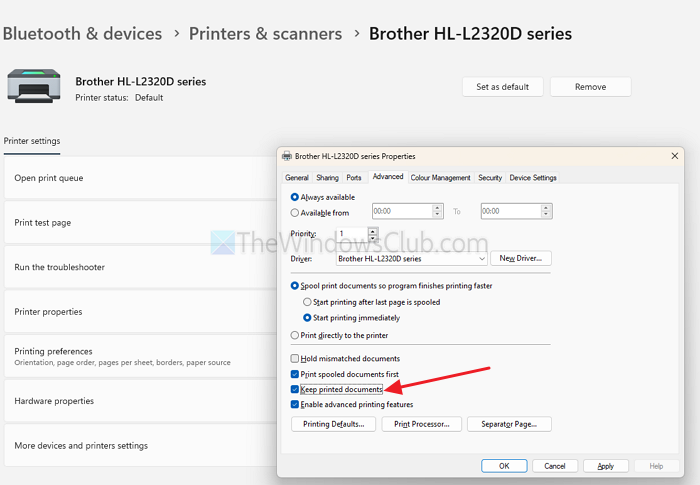
- Check the box for Keep printed documents.
- Click Apply, then OK.
- Next, press Win + R, type services.msc, and press Enter
- Scroll down to Print Spooler, right-click, and select Restart.
2] Open the Printer Properties via Print Management
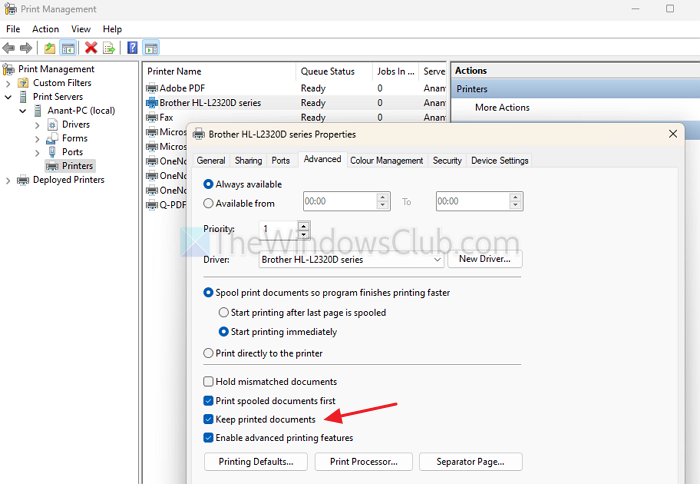
- First, open Print Management (printmanagement.msc) using the run prompt.
- Expand Custom Filters in the left pane and select Print Servers > PC Name > Printers.
- Right-click on the printer you want to configure and choose Properties.
- Select the Advanced tab on the printer properties window and check the box next to Keep printed documents to enable or disable the feature
- Close Print Management when finished.
Your printer will now retain printed documents in the queue, allowing you to reprint them without sending the print job again.
Read: How to check Print History in Windows
Does the Keep printed documents setting apply to all printers on the system?
No, the Keep printed documents setting is configured individually for each printer. If you want to enable this feature for multiple printers, you will need to activate it separately for each printer through their respective properties or settings.
Will enabling Keep printed documents allow me to view the content of previously printed documents?
Enabling this option retains the print job file in the queue, but it does not display the document’s content directly. To view or open the document, you would still need the original file unless it is stored elsewhere.
