
You can, if you wish, make your Windows computer download the latest recommended drivers, detailed information, and the latest realistic icons for your hardware devices automatically.
A driver is a software that allows your computer to communicate with hardware devices. Without proper drivers, the devices you connect to your computer won’t work properly
Download Device Drivers & Realistic Icons automatically
To make your computer download drivers automatically, open Control Panel > Device and Printers.
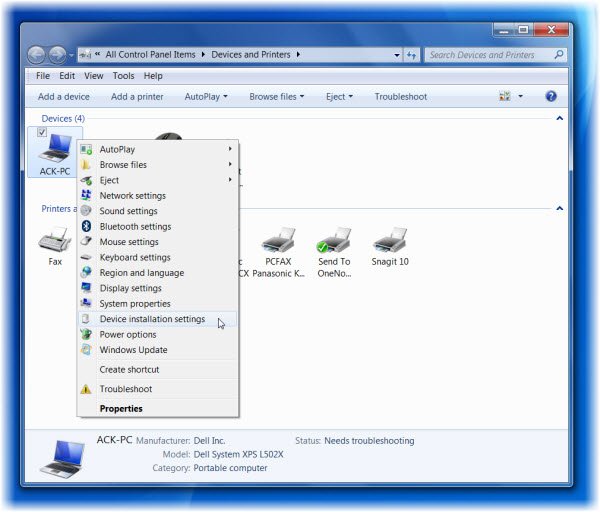
Right-click on the Computer icons and select Device installation settings.
In the window that opens, you will be asked: Do you want Windows to download driver software and realistic icons for your devices?
Select Yes, do this automatically (Recommended). Click Save Changes and exit.
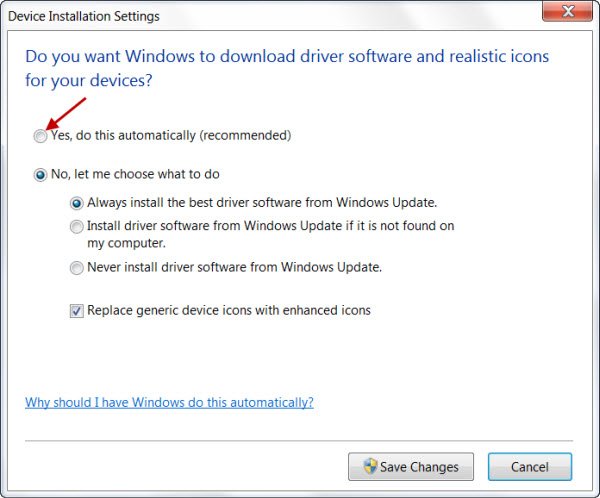
Your Windows PC will now automatically search for and download the latest drivers for your devices and high-resolution icons for many hardware devices, that you connect to your computer, along with detailed information about them – such as product name, manufacturer, model number and the detailed information about the sync capabilities of a device.
If you do not wish to have Windows do it automatically for you, you can disable automatic driver installation. Select No, let me choose what to do. You can decide what you want to be done and exercise your choice accordingly.
You can, if you wish, occasionally also re-confirm via Windows Updates > Check for Updates > View and install driver updates that are available for your computer.
I hope this helps!


