
The Hidden Text Editor in Windows 7

By Windows Club| February 5th, 2010. Filed under: Windows. Tags: ,

Windows 7, like its predecessors, Vista & XP, includes another text editor, apart from Notepad. It is called as the MS-DOS Editor.  To access it, simply type edit in Start Search and hit Enter.
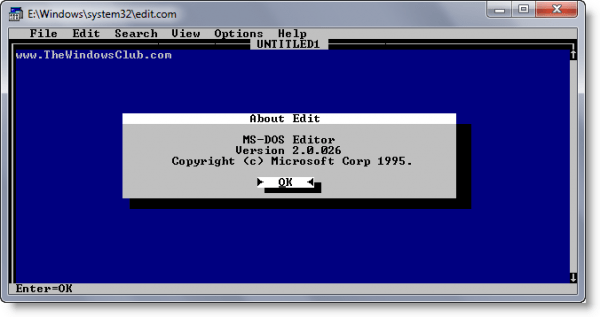
ms dos edit 600x317 The Hidden Text Editor in Windows 7

Located in C:\Windows\System32 folder, this Editor has all the features as Notepad, and more! With it you can also work with multiple text files, change background colors, change the color of the text, etc. You can also easily configure it to work just like a Windows application.

Do explore its settings and tabs and you will find that it has a lot to offer!

MS-DOS Editor came with MS-DOS (since version 5) and 32-bit versions of Microsoft Windows. Originally (up to MS-DOS 6.22) it was actually QBasic running in editor mode. With DOS 7 (Windows 95), QBasic was removed and MS-DOS Editor became a standalone program.

Editor is sometimes used as a substitute for Notepad, where Notepad is limited to small files only. Editor can edit files that are up to 65,279 lines and up to approximately 5MB in size. MS-DOS versions are limited to approximately 300KB, depending on how much conventional memory is free.[1] Editor can be launched by typing it into the Run command dialog on Windows, and by typing edit into the command-line interface (usually cmd.exe). Edit is still included in later versions of Windows such as Windows XP, Windows Vista 32 bit, and Windows 7 32 bit.

MS-DOS Editor v 2.0 first appeared with Windows 95, and appears in Windows 7 too. As it is a DOS program, it is not included in any 64-bit version of Windows.

Anand aka HappyAndyK is an end-user Windows enthusiast, a Microsoft MVP in Windows Desktop Experience since 2007, and the Admin of TheWindowsClub.com & WinVistaClub.com.
Windows Club
View all posts by Windows Club
Anands Profile
Related posts:
Random posts:
Recent posts:
Popular posts:

Comments

My copy of Windows 7 Professional doesn’t have it.

Note: If you accomplished Microsoft’s workaround for the Windows kernel vulnerability they announced last month, you won’t be able to run this editor because it’s a 16-bit program.

http://www.microsoft.com/technet/security/advisory/979682.mspx

all other windows version had that editor, by calling edit in the command prompt.
so whats so good about it?

Did not know this – why is it still there if its not commonly known or used? removing this and the 3 music files and more such flab could reduce windows size???

Windows 7 Ultimate (64-bit) does not include this application.

here is the problem that i have ,,,i have win7 ultemate,but wen i try to use the edit command on dos it doesnt work it gives error says this is not recognizable external or internal command…i read somewhere else that this command is no longer availible in win7 and win vista,so if this true could you show alternative way to excess the editor

The above man is true.. Simply access notepad in command prompt. Type NOTEPAD anywhere in windows 7. You Can use Notepad as Editor. But Remember while giving extension to the file.
I used it for Java Programs.

Nice copy/paste of the Wikipedia entry.

http://en.wikipedia.org/wiki/MS-DOS_Editor

^ Can you not see Allen? I have already credited that Wiki link in the post right from day one, for sourcing the para! See the Google cache if you please! :)

One of the best uses of this tool is to view text files created on a Mac or Unix-like system. Mac OS Classic uses CR for line endings while Unix-like systems use LF. Windows uses (and requires) the full CRLF in Notepad, but EDIT supports both and displays the document(s) correctly.


Leave a Comment