<?xml version="1.0" encoding="UTF-8"?>
<rss version="2.0"
	xmlns:content="http://purl.org/rss/1.0/modules/content/"
	xmlns:wfw="http://wellformedweb.org/CommentAPI/"
	xmlns:dc="http://purl.org/dc/elements/1.1/"
	xmlns:atom="http://www.w3.org/2005/Atom"
	xmlns:sy="http://purl.org/rss/1.0/modules/syndication/"
	xmlns:slash="http://purl.org/rss/1.0/modules/slash/"
	>

<channel>
	<title>The Windows Club &#187; MSconfig</title>
	<atom:link href="http://www.thewindowsclub.com/tag/msconfig/feed" rel="self" type="application/rss+xml" />
	<link>http://www.thewindowsclub.com</link>
	<description>The Windows Club is  created by Anand Khanse, a Microsoft MVP and is primarily targeted at the Windows 7, 8 &#38; Vista user and will address and cover issues in relation to Microsoft and Windows OS.</description>
	<lastBuildDate>Thu, 09 Feb 2012 03:47:25 +0000</lastBuildDate>
	<language>en</language>
	<sy:updatePeriod>hourly</sy:updatePeriod>
	<sy:updateFrequency>1</sy:updateFrequency>
	<generator>http://wordpress.org/?v=3.3.1</generator>
<xhtml:meta xmlns:xhtml="http://www.w3.org/1999/xhtml" name="robots" content="noindex" />
		<item>
		<title>Use msconfig to launch Windows tools like System Restore, Regedit, etc</title>
		<link>http://www.thewindowsclub.com/use-msconfig-to-launch-windows-tools-like-system-restore-regedit-etc?utm_source=rss&#038;utm_medium=rss&#038;utm_campaign=use-msconfig-to-launch-windows-tools-like-system-restore-regedit-etc</link>
		<comments>http://www.thewindowsclub.com/use-msconfig-to-launch-windows-tools-like-system-restore-regedit-etc#comments</comments>
		<pubDate>Fri, 07 May 2010 16:04:10 +0000</pubDate>
		<dc:creator>AnandK@TWC</dc:creator>
				<category><![CDATA[Windows]]></category>
		<category><![CDATA[MSconfig]]></category>
		<category><![CDATA[Tips]]></category>

		<guid isPermaLink="false">http://www.thewindowsclub.com/?p=9020</guid>
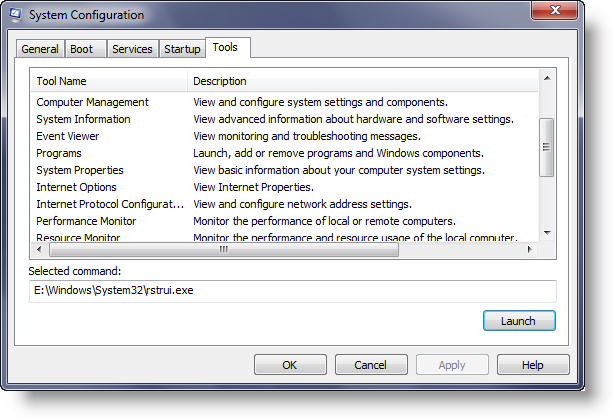
		<description><![CDATA[<div style=" float: left; padding: 4px; margin: 0 10px 5px 0; width: 75px; height: 75px;"><img style=" float: left; padding: 4px; margin: 0 10px 5px 0;" width="75" height="75" src="http://www.thewindowsclub.com/wp-content/themes/Twc/scripts/thumb.php?src=http://www.thewindowsclub.com/wp-content/uploads/2010/05/msconfig-tools-600x409.png&amp;w=75&amp;h=75&amp;zc=1"/></div>We are all familiar with the System Configuration Tool which comes to life when you type msconfig in the start search and hit Enter! What many of you may have have missed is that using this tool you can app <span><a class="more-link" href="http://www.thewindowsclub.com/use-msconfig-to-launch-windows-tools-like-system-restore-regedit-etc">...more &#62;&#62;&#62;</a></span>]]></description>
		<wfw:commentRss>http://www.thewindowsclub.com/use-msconfig-to-launch-windows-tools-like-system-restore-regedit-etc/feed</wfw:commentRss>
		<slash:comments>1</slash:comments>
		</item>
		<item>
		<title>How to remove the disabled items in MSconfig utility in Windows</title>
		<link>http://www.thewindowsclub.com/how-to-remove-the-disabled-items-in-msconfig-utility-in-windows?utm_source=rss&#038;utm_medium=rss&#038;utm_campaign=how-to-remove-the-disabled-items-in-msconfig-utility-in-windows</link>
		<comments>http://www.thewindowsclub.com/how-to-remove-the-disabled-items-in-msconfig-utility-in-windows#comments</comments>
		<pubDate>Mon, 07 Sep 2009 17:55:41 +0000</pubDate>
		<dc:creator>AnandK@TWC</dc:creator>
				<category><![CDATA[Downloads]]></category>
		<category><![CDATA[MSconfig]]></category>
		<category><![CDATA[Optimizers]]></category>

		<guid isPermaLink="false">http://www.thewindowsclub.com/?p=3204</guid>
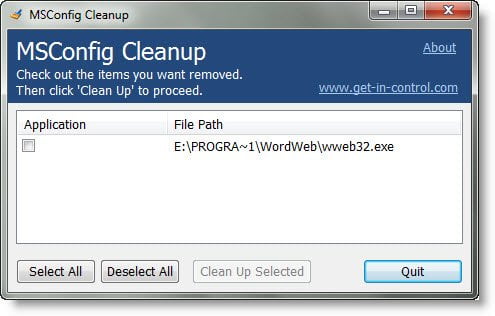
		<description><![CDATA[<div style=" float: left; padding: 4px; margin: 0 10px 5px 0; width: 75px; height: 75px;"><img style=" float: left; padding: 4px; margin: 0 10px 5px 0;" width="75" height="75" src="http://www.thewindowsclub.com/wp-content/themes/Twc/scripts/thumb.php?src=http://www.thewindowsclub.com/wp-content/uploads/2009/09/msconfigcleanuputility.jpg&amp;w=75&amp;h=75&amp;zc=1"/></div>MSConfig is a powerful tool that allows you to enable/disable the programs that start when Windows boots up.   MSConfig would be a perfect startup manager, if it allowed you not only to disable items, but to delete them forever. Unfortunately <span><a class="more-link" href="http://www.thewindowsclub.com/how-to-remove-the-disabled-items-in-msconfig-utility-in-windows">...more &#62;&#62;&#62;</a></span>]]></description>
		<wfw:commentRss>http://www.thewindowsclub.com/how-to-remove-the-disabled-items-in-msconfig-utility-in-windows/feed</wfw:commentRss>
		<slash:comments>2</slash:comments>
		</item>
	</channel>
</rss>