<?xml version="1.0" encoding="UTF-8"?>
<rss version="2.0"
	xmlns:content="http://purl.org/rss/1.0/modules/content/"
	xmlns:wfw="http://wellformedweb.org/CommentAPI/"
	xmlns:dc="http://purl.org/dc/elements/1.1/"
	xmlns:atom="http://www.w3.org/2005/Atom"
	xmlns:sy="http://purl.org/rss/1.0/modules/syndication/"
	xmlns:slash="http://purl.org/rss/1.0/modules/slash/"
	>

<channel>
	<title>The Windows Club &#187; Hosts</title>
	<atom:link href="http://www.thewindowsclub.com/tag/hosts/feed" rel="self" type="application/rss+xml" />
	<link>http://www.thewindowsclub.com</link>
	<description>The Windows Club is  created by Anand Khanse, a Microsoft MVP and is primarily targeted at the Windows 7, 8 &#38; Vista user and will address and cover issues in relation to Microsoft and Windows OS.</description>
	<lastBuildDate>Wed, 08 Feb 2012 18:37:32 +0000</lastBuildDate>
	<language>en</language>
	<sy:updatePeriod>hourly</sy:updatePeriod>
	<sy:updateFrequency>1</sy:updateFrequency>
	<generator>http://wordpress.org/?v=3.3.1</generator>
<xhtml:meta xmlns:xhtml="http://www.w3.org/1999/xhtml" name="robots" content="noindex" />
		<item>
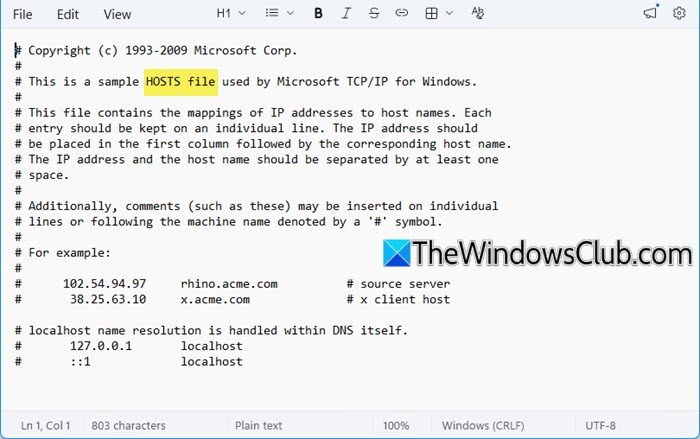
		<title>How to set the Windows 7 hosts file back to default.</title>
		<link>http://www.thewindowsclub.com/how-to-set-the-windows-7-hosts-file-back-to-default?utm_source=rss&#038;utm_medium=rss&#038;utm_campaign=how-to-set-the-windows-7-hosts-file-back-to-default</link>
		<comments>http://www.thewindowsclub.com/how-to-set-the-windows-7-hosts-file-back-to-default#comments</comments>
		<pubDate>Thu, 18 Jun 2009 13:25:47 +0000</pubDate>
		<dc:creator>AnandK@TWC</dc:creator>
				<category><![CDATA[Security]]></category>
		<category><![CDATA[Hosts]]></category>

		<guid isPermaLink="false">http://www.thewindowsclub.com/?p=1568</guid>
		<description><![CDATA[If for some reason, you wish to reset your Windows 7 Hosts file situated at C:\Windows\System32\drivers\etc you can follow these steps: Click Start and type copy-paste in start search : %systemroot% \system32\drivers\etc and hit Enter. If you are using 64 <span><a class="more-link" href="http://www.thewindowsclub.com/how-to-set-the-windows-7-hosts-file-back-to-default">...more &#62;&#62;&#62;</a></span>]]></description>
		<wfw:commentRss>http://www.thewindowsclub.com/how-to-set-the-windows-7-hosts-file-back-to-default/feed</wfw:commentRss>
		<slash:comments>3</slash:comments>
		</item>
		<item>
		<title>How to remove ads from Windows Live Messenger.</title>
		<link>http://www.thewindowsclub.com/how-to-remove-ads-from-windows-live-messenger?utm_source=rss&#038;utm_medium=rss&#038;utm_campaign=how-to-remove-ads-from-windows-live-messenger</link>
		<comments>http://www.thewindowsclub.com/how-to-remove-ads-from-windows-live-messenger#comments</comments>
		<pubDate>Tue, 14 Apr 2009 07:23:36 +0000</pubDate>
		<dc:creator>AnandK@TWC</dc:creator>
				<category><![CDATA[Live]]></category>
		<category><![CDATA[Hosts]]></category>
		<category><![CDATA[Messenger]]></category>

		<guid isPermaLink="false">http://www.thewindowsclub.com/?p=507</guid>
		<description><![CDATA[If you dont like ads appearing at the bottom of your Windows Live Messenger and you&#8217;d like to remove them  you can do so easily!  a) You could modify the Hosts file. The Hosts file contains the mappings of IP <span><a class="more-link" href="http://www.thewindowsclub.com/how-to-remove-ads-from-windows-live-messenger">...more &#62;&#62;&#62;</a></span>]]></description>
		<wfw:commentRss>http://www.thewindowsclub.com/how-to-remove-ads-from-windows-live-messenger/feed</wfw:commentRss>
		<slash:comments>0</slash:comments>
		</item>
	</channel>
</rss>