
We are pleased to release Start My Day application for Windows 7 & Vista. Start My Day is a first of its kind freeware process launcher for Windows users. Simply put, Start My Day is for those users who hate going through the same process each day, loading this and that.
UPDATE 06th Aug: Start My Day v2 has been rewritten completely to give it a new look, user interface, and more features.
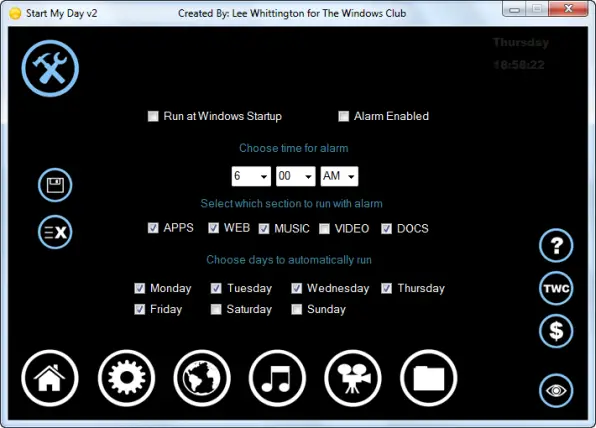
About Start My Day v 2.0: Here are the new features added to this version:
- The app now support the following extensions: *.ahk; .bat;*.bin; *.cmd;*.exe; *.iso; *msc; *.msi; *.torrent; *.wsf; *.vbs
- The web is now Compatible with all Web Browsers as I did away with *.url links and added the option to paste web links.
- Music now supports the following extensions (still saves as WMP Playlist file): *.midi; *.mp3; *.mp4; *.wav; *.wma
- Video has been added and supports the following extensions (Saves as a WMP Playlist wvx file): *.avi; *.divx; *.mov; *.mpg; *.mpeg; *.wmv; *.xvid *.mkv
- Documents have been added and supports the following formats: *.accdb; *.cfg; *.dat; *.doc; *.docx; *.ini; *.log; *.mht; *.msg; *.ods; *.one; *.psd; *.xps; *.xlsx; .xlt; *.xls; *.odt; *.pdf; *.pps; *.pptx; *.rtf; *.txt; *.sdb; *.sql; *.wps; *.wks; *.wpd; *.xml
- Added option to select which dialog, App, Web, Music, Video, Documents, to run at specified alarm time. If you select Music you will not be able to select the video and vice versa as this would be a conflict and overwrite each other in your Media Player.
- Duplicate entries are checked when adding so that you do not add items more than once.
- Paste Weblinks directly to the Web List or use the Browse option to add them.
- Added option to go directly to the SMD Forum page for feedback and or help.
- When you minimize the application it starts the Taskbar Notification area icon. You also have
- available Right-Click menu options with the icon to start the alarm or end it.
- Bug Fixes: Fixed where days did not display correctly.
- Removed the Settings folder under User Directory and now creates Directories within the Application Directory, and removed the separate About file and embedded it within the application.
With Start My Day, a user can pre-configure a list of applications web links and music to automatically load using an Alarm clock. A user also has the option of running them manually from the list. The application supports dragging and dropping items to the list as well as browsing for items.
The software has three tabs or lists. The App list, Web list & Music list.
The Application List will only accept .exe files currently.
The Web List will only accept .url files which can be found in your Favorites folder.
The Music List will only accept .mp3 files. The playlist is saved in the WPL format. Players that play the WPL Playlist type are Windows Media Player, Winamp, VLC, etc.
The save settings for all items are stored in the following location: C:\Users\Username\AppData\Roaming\Start My Day.
The app may get some time getting used to but, but once you get the hang of it, you will find that since it automates most of the things you do daily, it makes computing that much easier for you!

Start My Day v 2.0 has been developed by Lee Whittington for The Windows Club and has been tested on Windows 7, but may work on other Windows versions too.
If you liked this freeware, you might want to see our other exciting freeware releases for Windows here!
