
When your Windows 11 device goes through an update, it is required to restart. The reboot is the final step of the update process. If you need Windows 11 to notify you when it is time for an update, then please read through this article.
Disable or Enable Update Restart Notification in Windows 11
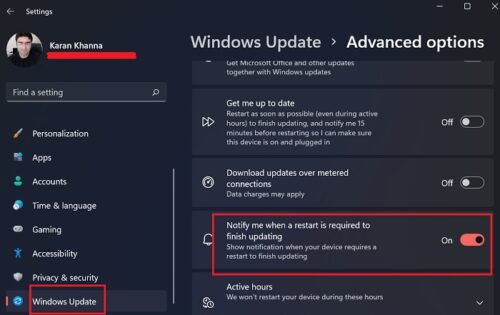
The procedure to make Windows 11 show a notification when your device requires a restart to finish updating the OS is as follows:
- Right-click on the Start button and select Settings.
- In the Settings window, go to the Windows Update tab on the list on the left-hand side.
- Click on Advanced options in the right-pane.
- On the next page, turn ON the switch associated with Notify me when a restart is required to finish updating.
- Reboot your system.
Show Notifications when your device requires a restart to finish updating in Windows 11
The option to remind you to restart your system for completion of a pending update isn’t necessary but recommended. Essentially, Windows Updates run in the background. Once complete, the system would wait for you to reboot it. That’s when the updates would come into effect.
Now, many users don’t switch off their computers for days, weeks, or months. In this case, either the updates never install or the system forces a restart with a 15-minute ultimatum when featured updates are absolutely necessary.
Thus, those who don’t usually switch OFF their computer and want the updates to install should definitely try this option.
Why are Windows Updates important?
Now we understand that updates are installed in the background, but a reboot is required for them to take effect. How about not rebooting a system for months (after which a forced update would happen)? That wouldn’t be a good idea because updates not only change the system’s structure but also push security updates, which are important for protecting against cyberattacks.
Why did Microsoft change the position of Windows Update option in Windows 11?
Windows 11 has given Windows Update a special place in Settings to highlight its importance. Windows Update process has also changed. It is now different and offers a more accessible framework. In Windows 11, they began organizing settings and options based on usability after conducting extensive research. Since Windows Updates were used quite frequently, it was given a separate menu and the terms were made easier to understand.
