
We are pleased to release PinToStartMenu. PinToStartMenu lets you pin Control Panel items and folders to Windows Start Menu, via your right-click context menu.
Pin Control Panel items and folders to Start Menu
There are three different ways using which we can add folders to the start menu and/or even add ‘Pin to start menu item’ to the right-click context menu of folders in Windows. To add Control Panel items to the start menu, you have to create its shortcut on your desktop and then drag and drop it into the start button (orb).
UPDATE: This post will show you how to pin Control Panel to Start Menu or Taskbar in Windows 11/10.
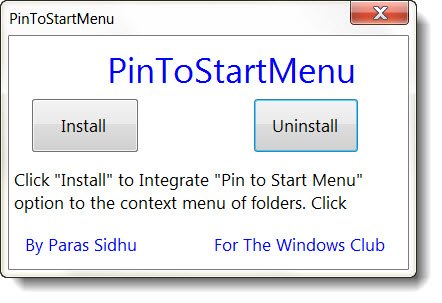
PinToStartMenu makes things easier. It adds the ‘Pin to start menu’ item to the context menu of folders and the Control Panel applets.
Once you have downloaded this freeware portable app, run the app ‘as admin’ and click Install to install the items in the context menu.
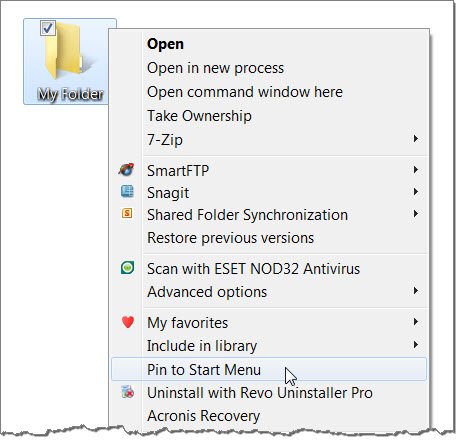
To see the “Pin to start menu” item in the context menu of folders, press ‘Shift+right click’.
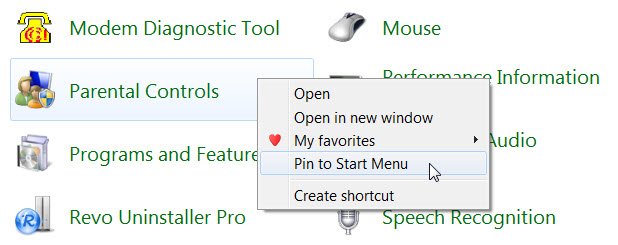
To see “Pin to start menu” in the context menu of Control Panel applets, simply right-click any item. You will also see the option Pin To Start Menu.
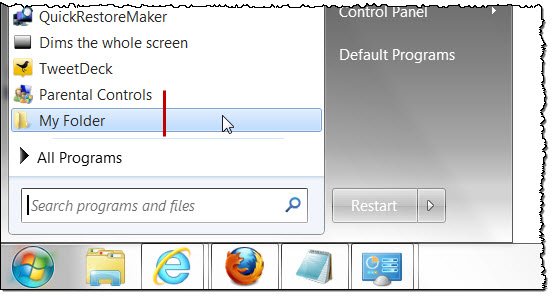
Now every time you need to access some applet, like for instance the Programs and Features (Uninstall programs) or the Parental Controls applet, or your favorite folder, you can do so immediately.
To remove this item from the context menu, simply click the Uninstall button on the app. The context menu items will be removed. PinToStartMenu has been tested on Windows 7 32-bit and 64-bit, but works on Windows 10 too.

PinToStartMenu v1 has been developed by Paras Siddhu for The Windows Club.
If you’d like to see more of our free releases of e-books, software, themes, etc, click here.
