
Read receipts have become an integral part of messaging applications these days. Most of our work relies upon these receipts and they ensure the delivery of messages. But emails are a thing of the past; we never know whether the recipient opened the email. This is not the case anymore. With services like MailTrack, you can track your email after you’ve sent them. MailTrack is intended for Google Chrome and Gmail users, and we hope to see it soon for other email providers as well.
MailTrack email tracking tool for Gmail
MailTrack is a browser extension for Chrome, Firefox, Opera and Edge that offers email tracking services. It is compatible with Gmail and Google Inbox for now and integrates seamlessly into the web apps. The service offers both free and premium plans with extra features. This post majorly talks about the free plan, you can always upgrade to any of the paid plans for more features.
MailTrack is mostly used by professionals, sales teams, and people with client relations. The tool makes it a little easier to track emails, and you do not need to repeatedly ask, “Did you read my email?” So if you are anyone looking for such features, MailTrack it is.
So, getting started is simple: install the extension from the Chrome Web Store. And now log in using your Google Account. Once the setup is complete, you can start using its features directly from your Gmail inbox.
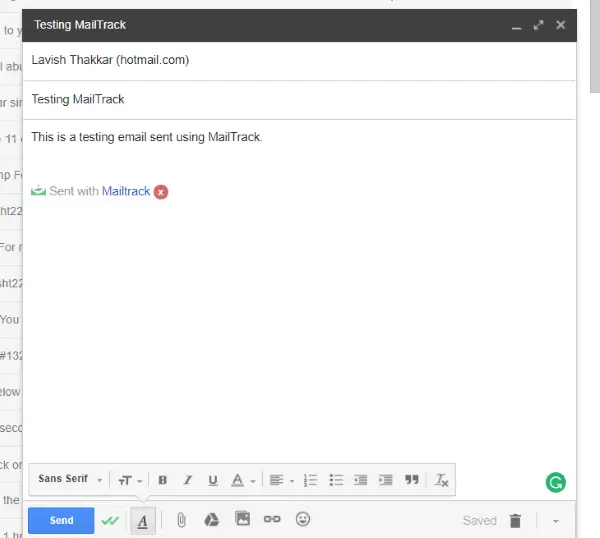
Log in to your Inbox and you will notice a green MailTrack icon in the upper-right corner, indicating that the extension is installed and running. You can start composing an email as usual. The tool will put a small signature in the email, to disable it you need to upgrade to a premium plan. You can click the double-tick icon below to customize MailTrack settings for this particular email.
Once you are done composing an email, you can hit the send icon and now move on to the sent items. In the sent items folder, you can track your email using the double ticks next to each sent item. The double ticks work similarly to WhatsApp. Single tick if the email was delivered, double ticks if it was opened by the recipient. Moreover, you can hover over the double ticks to view more details. You can view the total number of times your email was opened and the time of the first read. The premium version offers a full tracking history, which can provide many more metrics.
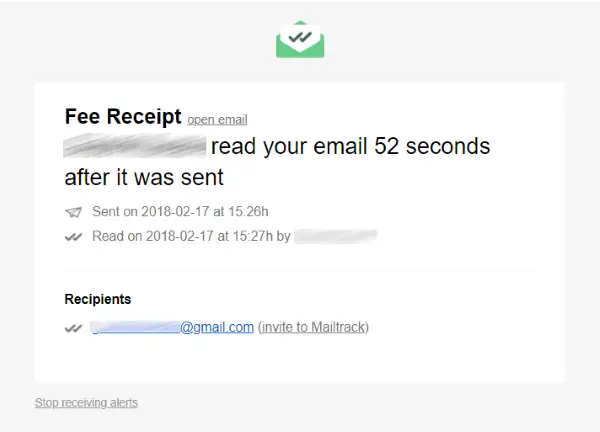
You can even enable MailTrack alerts which can notify you whenever someone opens an email sent by you. The alerts are very informative and lets you know the exact time when the email was opened.
MailTrack offers a variety of customization as well. You can head over to your dashboard to customize your account and enable/disable settings.
MailTrack is a great tool for professionals and teams. Email tracking not only improves communication but also ensures effective deliverability. If you deal with a lot of customers, then MailTrack can help you know the average time your customers take to read your email and how you can improve it. Moreover, you can enable Link tracking to know how your recipients deal with the links you have in your email. Overall, this is a great add-on service, and it works for most cases. For personal usage, the free plan is quite sufficient. But if you are planning to upgrade, the premium plan with all features unlocked might cost you around 2.5$ a month, which is economical.
Click here to download MailTrack. The free plan offers Unlimited tracking but has a Mailtrack signature
