
Mail your file directly from your context menu with MailMyFile

Speed Up My PC

We are pleased to released MailMyFile. Do you find yourself mailing files to a particular email address very regularly? If so then freeware MailMyFile will make things a lot easier for you.

Simply download an install MailMyFile. Once you have downloaded the file and the installation is complete, a Settings box will open once.

Fill in the details including the email ID, password (The Passwords are encrypted before they are saved in settings.), Host (For example Hotmail is smtp.live.com, GMail is smtp.gmail.com, Yahoo is smtp.yahoo.com, etc.), Port details (The most common are port 25 and 587. So check your email settings to make sure), SendTo email address, Email title and message, etc.

mail my file Mail your file directly from your context menu with MailMyFile

The application will install to your Username\Documents\MailMyFile directory. It will add and entry to your right click context menu.

To mail this file to your regular email address, simply right click it and select Mail My File!
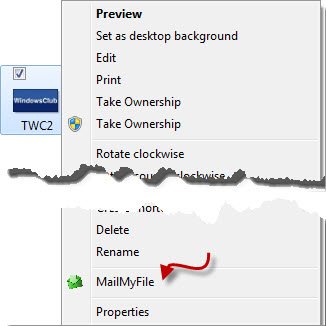
mailmyfile1 Mail your file directly from your context menu with MailMyFile

If you have email set to automatic, once you select MailMyFile email will be sent automatically and you will simply see a dialog box at the end. Thats it! No need to open your mail client or visit the website!
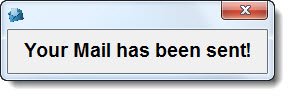
mail sent Mail your file directly from your context menu with MailMyFile

To access the settings again, hold Shift and right click the file.
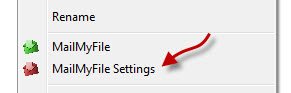
mailmyfile2 Mail your file directly from your context menu with MailMyFile

The Settings box will open and you will be able to change your settings.

download1 Mail your file directly from your context menu with MailMyFile

MailMyFile v 1.0 Beta has been developed by Lee Whittington for The Windows Club.

softpedia Mail your file directly from your context menu with MailMyFile majorgeeks approved Mail your file directly from your context menu with MailMyFile brothersoft Mail your file directly from your context menu with MailMyFile

If you wish to give feedback and have any questions, you may direct them to TWC Forum.

Posted by on , in Category Downloads with Tags
Anand aka HappyAndyK is an end-user Windows enthusiast, a Microsoft MVP in Windows Desktop Experience since 2007, and the Admin of TheWindowsClub.com, TheGeeksClub.com & WinVistaClub.com. Creating a System Restore Point before trying out a new software or a tweak is always recommended.
  • Locutus

    I’d like to have an option to save it as, say, a draft on Gmail and have Firefox open to that draft. That way I could change anything I need to change (subject, body, recipient) before sending.

  • http://www.thewindowsclub.com/about Windows Club

    The developer Lee says:

    You can do this through the application without having to open your email program.

    When you open your settings you have the option of not Automatically Sending the email. Just uncheck this option and when you click to email the file the application will appear for you to make any changes.

    If you need help with email Host’s and Port’s this may help you: Incoming and Outgoing Mail Server Settings.

  • Paultx

    A portable version will be available in the near future?