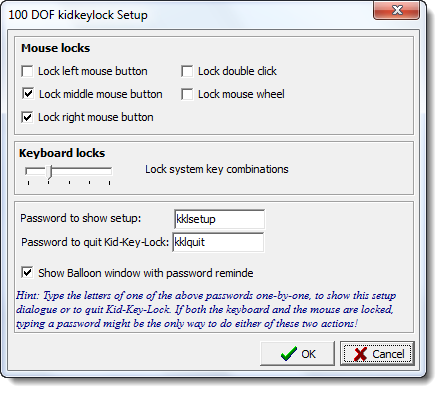
Kid-Key-Lock is a simple program that can lock specific keyboard keys & mouse functions, depending on your preferences. Rather than locking up your Windows PC, you can now lock the keyboard and mouse!
Lock your Keyboard & Mouse to secure your PC with Kid-Key-Lock
When Kid-Key-Lock is running, an indicator icon will appear on your system tray. When you click on the tray icon, a pop-up menu will appear. All program functions, including the setup dialog box, are accessible from this menu and are password protected.
Features:
• Very simple to set up and run
• Sits on the tray for easy access
• Mouse Lock options:
- Left mouse button
- Middle mouse button
- Right mouse button
- Double click
- Mouse wheel
• Keyboard lock options:
- Standard character keys, letters, numbers, signs, etc
- Additional keys, Navigation keys, function keys, ins/del, home/end, etc
- Windows system shortcuts e.g. alt-tab, win-key, etc
Visit: Download Page. The program works on Windows 11/10/8/7.
BlueLife KeyFreeze is another freeware that lets you lock the keyboard and mouse in Windows.