
The This PC folder, by default, displays your basic hard drives. But if you want to show all the drives, including the empty ones, like say a memory card reader, in your Windows File Explorer, you can do so as follows.
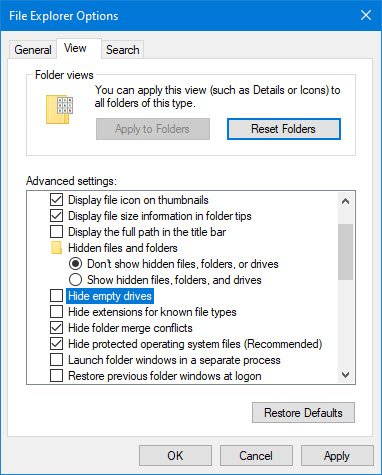
Show all Drives in This PC folder of Windows 11/10
To show all Drives in This PC folder of Windows 11/10, do the folowing:
- Launch Explorer
- Open Folder & Search options
- Select View tab
- Locate Advanced settings
- Uncheck Hide empty drives in the Computer folder
- Click Apply > OK.
All drives will now always be visible on your Windows 11/10 PC.
If you wish to reverse the changes, simply check the option and click on Apply again
This option is there in Windows 8.1 too, where you can show all hidden drives too in the This PC folder.
Now read: How to change Drive Icons in Windows 11/10.

