
There may come a time when you may want to or need to reset your Windows Security settings to default values. Maybe you messed them up while configuring them manually or maybe your PC just recovered from malware infection. If for some reason you’d like to reset all your Windows 11 or Windows 10 security settings to their default values, you may do so as follows.
Reset Windows Security Settings
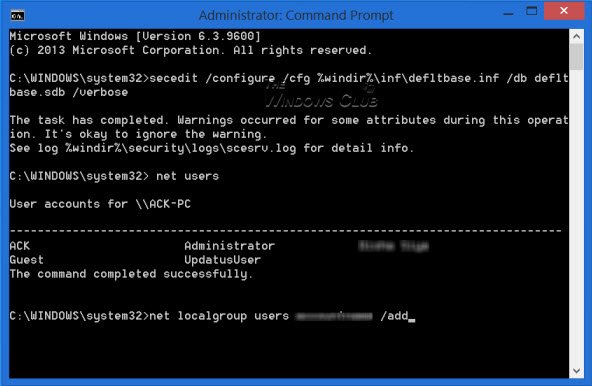
Open an elevated command prompt and type the following command:
secedit /configure /cfg %windir%\inf\defltbase.inf /db defltbase.sdb /verbose
Hit Enter.
After you run this, the standard user accounts may no longer appear on the login screen when you restart your computer or try to switch users.
This occurs because standard user accounts are removed from the Users group when you reset Windows security settings.
To add the affected user’s accounts back to the Users group, follow these steps.
Open an elevated command prompt. In the Command Prompt window, type net users and hit Enter. A list of user accounts will be displayed.
For each account name listed in the Command Prompt that is missing from the log on or switch user screen, type the following command and hit Enter.
net localgroup users accountname /add
In Windows10/8/7/Vista, the Defltbase.inf file is a Security configuration template for the default security. You can view the settings for this file in the following location:
%windir%\inf\defltbase.inf
You will see all changes made, in a newly created log file situated at the following location:
C:\Windows\security\logs\scesrv.log
If you don’t want to do it manually, you can simply use this Microsoft Fix it 50198 to let do all this, automatically.
Related: How to reset Windows Security or reinstall Windows Defender
NOTE: Security settings consist of settings defined in deftbase.inf augmented by settings applied by the operating installation process and server role installation. Because there is no supported process to replay the permissions made by the operating system setup, the use of secedit /configure /cfg %windir%\inf\defltbase.inf /db defltbase.sdb /verbose command-line may no longer be capable of resetting all security defaults.
Related read: How to Reset Windows Firewall settings to defaults.

