
In the online world, sometimes you hardly have control over your actions. What do I mean by this? Consider a case where you receive an email with a file attached, complete with viruses or malware. What do you do? Unaware of the file’s real nature, you click open and invite viruses and other malware to infect your computer. How about having software that gives you detailed data about any file on your computer before you open it?
If you like the idea, then check out FileType ID, a dependable application that protects your computer from such vulnerabilities and helps disperse all your worries. The lightweight and easy-to-use application help you view detailed information about a file by analyzing its binary signature. The program is particularly useful for viewing what type of file was sent to you by e-mail.
FileType ID can analyze Suspicious Behaviour of a File
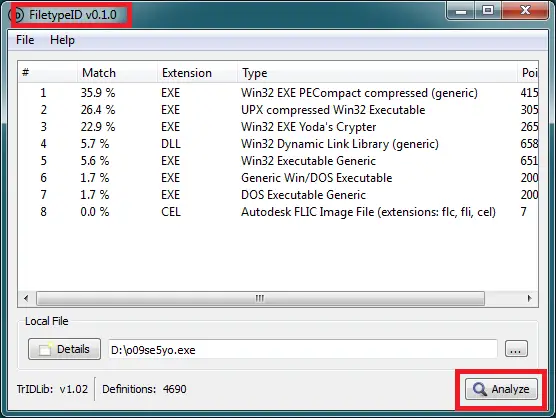
FiletypeID is written in Python based on PyQt4 and TrIDLib. It has the ability to quickly and accurately analyze any suspicious file on your PC. As of now, the program includes about 4697 file-type definitions.
The program allows you to conveniently save a result in an easy-to-manage HTML format document and share it with your friends to get a second opinion, in case something looks suspicious.
How to use FileType ID
- An important feature of FileType ID is that it is portable so it does not require any kind of installation to run. The program can easily be copied to a USB Memory stick and used when required.
- Once you have downloaded the software, unpack it on your local system
- Then, you can select the desired file (either by browsing through your folder or simply by dragging and dropping it in the window of the program)
- Once done, press the ‘Analyze’ button to force the application to display the results.
- FileTypeID proves to be useful especially when you encounter a file without an extension that you want to open. It is of little use when you already know the file type that’s because you can always perform a search on the Internet to find a program that is compatible with file extension.
FileType ID is based on the file identifier trID. You can download it from softpedia.com.
