
At times you may get a Low Disk Space message or notification or warning popup from the right side of your Windows taskbar – You are running very low on disk space on disk, To free space on this drive by deleting old or unnecessary files click here.
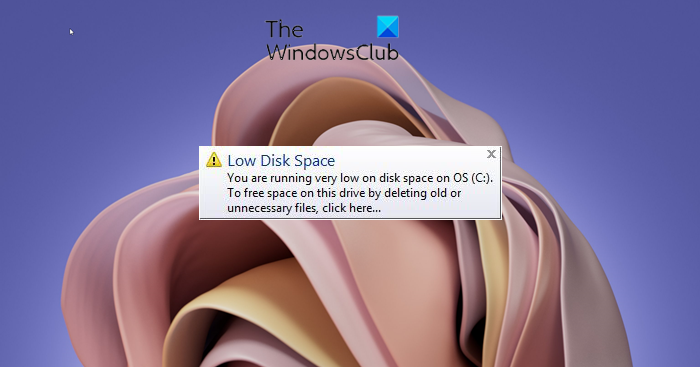
Disable Low Disk Space message in Windows
The balloon notification is meant to warn you that you are running out of disk space. But at times, you may get it for no apparent reason.
If you feel you are truly running out of disk space, you might want to clean up some disk space.
Windows Vista checks for available disk space every minute, but Windows 7/8/10/11 and later, by default checks for available disk space every 10 minutes, and the pop-up remains for 10 seconds. This is by design, keeping in mind certain performance issues.
So it is quite possible that your Windows 11/10 may never warn you about this, while you actually consuming disk space, maybe when you are in the process of pasting large amounts of data. It may warn you when it is too late, ie after 10 minutes!
These are the threshold levels where you may see the pop-ups:
- Free space less than 200 MB: You are running out of disk space on the drive.
- Free space less than 80 MB: You are running very low on disk space on disk
- Free space less than 50 MB: You are running very low on disk space on disk
- No free space remaining: You have run out of disk space on the drive.
Using Registry Editor
If you want, you can disable this Low Disk Check through the Windows Registry. To do so open regedit and navigate to the following key:
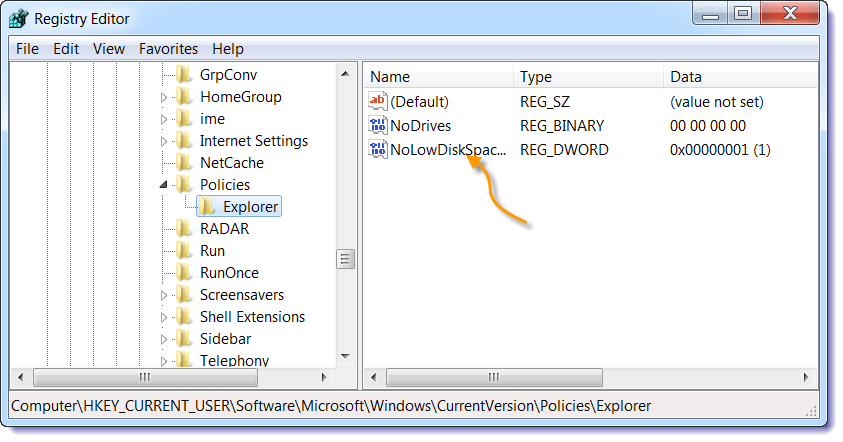
HKEY_CURRENT_USER\SOFTWARE\Microsoft\Windows\CurrentVersion\Policies\Explorer
Create a new DWORD Value named NoLowDiskSpaceChecks and give it value 1.
Using Ultimate Windows Tweaker
You can also always use our portable freeware Ultimate Windows Tweaker to do so easily. You will see it under Customization > File Explorer. There are different versions available for Windows 11, Windows 10, Windows 8.1, and Windows 7.
Therefore, it may be a good idea to check your available drive space if you are planning to write a large amount of data to it.
You can use the Disk Cleanup utility or CCleaner to clear up some disk space.
Read: How to increase Hard Drive speed & performance in Windows.
If you wish to analyze where your disk space has gone, you can check out Disk Space Fan or Space Sniffer.
The Disk Footprint Tool in Windows 11/10 will let you carry out several tasks pertaining to Disk Space usage. You can use it to take snapshots, summaries, analyze disk usage, anonymize, compare growth over time using disk growth study, and more.
