
There may be times when you might want to quickly show a clean desktop by hiding all the icons. If you want to hide or unhide the desktop icons, or if your Desktop icons are not showing in Windows 11/10/8/7, then this post is sure to help you.
Unhide or Hide Desktop icons in Windows 11/10
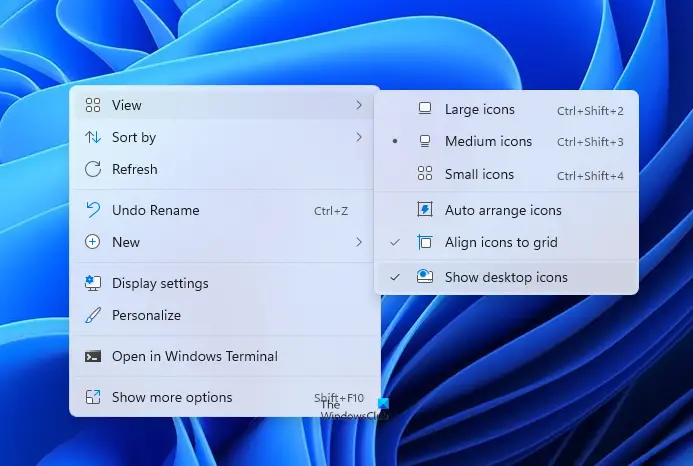
To hide desktop icons in Windows 11/10, do the following:
- Right-click on your desktop
- Select View
- Uncheck Show desktop icons.
- This will hide the icons.
- To show the icons, simply select the option.
Desktop icons are missing
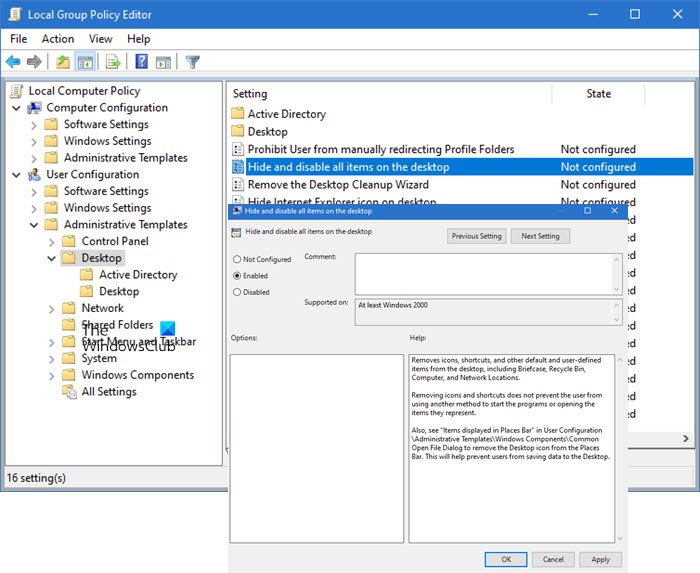
If you find that your desktop icons are missing, type gpedit.msc in the Start menu and hit Enter to open the Group Policy Editor.
Navigate to:
User Configuration > Administrative Templates > Desktop.
Now select the Desktop folder, present in the right pane. On the right-side locate Hide and disable all items on the desktop.
Double-click on it to open its Properties box.
This setting removes icons, shortcuts, and other default and user-defined items from the desktop, including Briefcase, Recycle Bin, Computer, and Network Locations. Removing icons and shortcuts does not prevent the user from using another method to start the programs or opening the items they represent.
If Enabled, this setting removes icons, shortcuts, and other default and user-defined items from the desktop, including Recycle Bin, Computer, and Network Locations.
To show desktop icons, ensure that the setting is Not Configured.
Hit Apply > OK.
Restart your computer and see if it has helped.
TIP: This post will show you how to auto-hide desktop icons in Windows 11/10.
Incidentally, on a related note, this post will help you if your Desktop Icons not working or are unclickable. Usually, this happens if the file associations are messed up.
How do I get different icons on my desktop?
Go to Windows Settings > Personalization > Themes and click on Desktop icon settings. It will open another window where you can change icons of This PC, User Folder, Network, Recycle Bin using the Change Icon button. If you don’t want themes to change these icons, uncheck the box next that allows changing theme desktop icons.
Related: Fix Desktop icons not showing.
How do I put icons anywhere on my desktop Windows?
Right-click on the Desktop and then click on View. Make sure to untick the Auto Arrange icons option. You can also uncheck the Align icons to girds option. If you don’t do this, whenever you move the icon, it will automatically arrange and move with the rest of the icons on the desktop.
Read: How to make Desktop Icons invisible in Windows 11
How to remove text in shortcut icons?
Usually, the text in the shortcut icons is of no use as the icons themselves are enough to know which app it points to. Changing it is very simple. Select the shortcut icon, and then press F2. Then use the delete key to remove the text, and press the Enter key. Now all you will see is the icon.

