
Using the Group Policy setting – Delete user profiles older than a specified number of days on system restart, you can now delete old User profiles and files automatically in Windows 11/10.
This policy setting allows an administrator to automatically delete user profiles on system restart that have not been used within a specified number of days after a specific user profile was accessed. You may need to do this if you are working in an environment where many users come, create a user profile, use the system for a while, and go away – like, say, an academic institution or a workplace – and you don’t want unused user profiles clogging your system.
Delete user profiles older than a specified number of days on system restart
You can use the Local Group Policy Editor to delete user profiles older than a specified number of days on system restart. On creating a user profile on the Windows 11/10 computer, a folder with its name is automatically created in the Users folder that is located on the C drive. This folder contains the data of that user. The user data consumes space on the C drive. Therefore, multiple user profiles consume more space on the C drive. Hence, deleting the older user profiles can free up space on the C drive.
This method requires the use of Local Group Policy Editor, which is not available on Windows 11/10 Home editions. Therefore, Windows 11/10 Home users can skip this. To configure this setting, type gpedit.msc in start search and hit Enter to open the Group Policy Editor. Next, navigate to:
Computer Configuration > Administrative Templates > System > User Profiles.
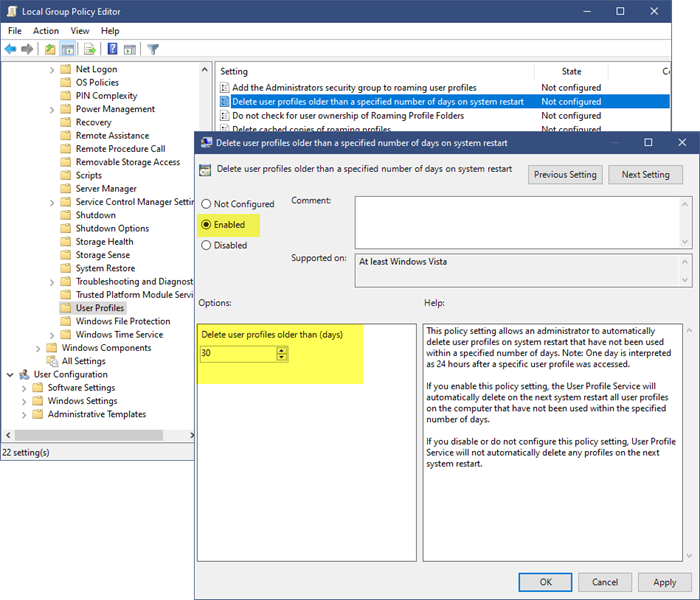
Now in the right-hand side details pane, double-click on Delete user profiles older than a specified number of days on system restart to open its configuration box.
This policy setting allows an administrator to automatically delete user profiles on system restart that have not been used within a specified number of days. Note: One day is interpreted as 24 hours after a specific user profile was accessed.
If you enable this policy setting, the User Profile Service will automatically delete on the next system restart all user profiles on the computer that have not been used within the specified number of days.
If you disable or do not configure this policy setting, User Profile Service will not automatically delete any profiles on the next system restart.
Select Enabled and then set the number of days. Click Apply and then click OK.
I hope this helps.
How do I delete old user profiles on Windows 11?
You can delete the old user profiles via the Advanced System Settings or the Registry Editor. The latter method can be complicated for some users as it requires Registry modifications. Therefore, if you are not an advanced user, we suggest you use the first method to delete the user profile(s). Open Windows 11 Settings and go to System > About > Advanced System Properties. Click Settings in the User Profiles section. Now, you can delete a user’s profile.
Does deleting user profile delete files?
The user profile data is stored inside the User Profile folder that is located on the C drive. Deleting a user profile or account on a Windows computer also deletes all its data, including items on the Desktop, Documents, Downloads, Photos, etc. If this data is not saved in another location, it will be lost. However, if you have linked OneDrive to your account, your files will be backed up to the cloud, provided the folders are linked to OneDrive.
Read next: How to rename built-in Administrator Account in Windows.
