
Keyboards are quite handy if you need to do something quickly. If you visit a particular website often, then you can even create a keyboard shortcut, so that every time you click on it, your favorite website will open in a browser window. To do this, you can follow this procedure.
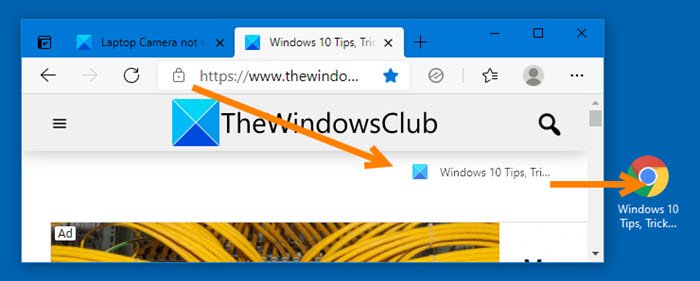
How to create Keyboard shortcut to open website
- Open your favorite browser, eg, Chrome, Edge, Firefox, etc.
- Next, open the website whose keyboard shortcut you want to create.
- Drag and drop the website favicon onto your desktop.
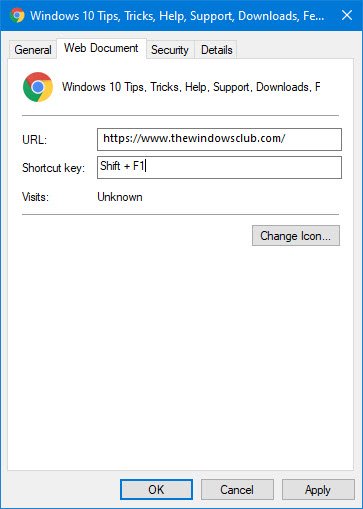
- Right-click on the shortcut and select Properties.
- Open the Web document tab
- Place the mouse cursor in the Shortcut key field and click on the keyboard shortcut of your choice
- The keyboard shortcut will appear in the field.
- Click Apply and exit.
This post will show you create how to create a desktop shortcut to open website.
If you are using Internet Explorer, click on Favorites and right-click a favorite website, whose keyboard shortcut, you want to create.
Select Properties. Now in the Properties box > Web Document tab, place your cursor in the Shortcut key panel.
Click the preferred shortcut key/s (say Shift+F1) on your keyboard. These will get displayed in the panel.
Click Apply > OK.
Now click the keys Ctrl+F2, and you will find your browser opening the website.
Hope you find this small tip useful.

