
Its always a trend that people like to go back to the old look, and feel of Windows. When we moved to Windows 7, people wanted Windows XP looks. The same went for Windows Vista, Windows 8.1, and Windows 11/10. The urge to go back to the Classic Start Menu is even higher among Windows 11/10 users. Not everyone is a big fan of Tiles and expanded Start Menu. So in this post, we are going to introduce you to Classic Start now rebranded as Open Shell – a Classic Shell alternative.
Get the classic Start menu on Windows 11/10
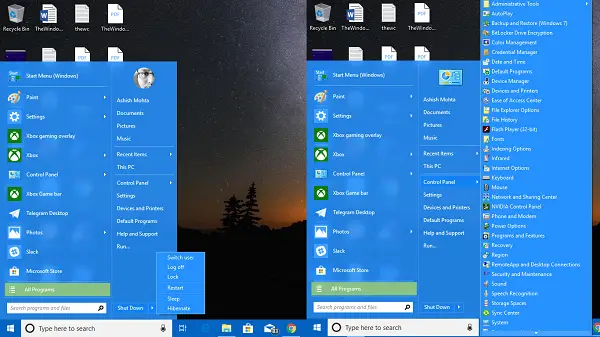
This software not only gives you back the old Windows Start menu, but it does a lot more. You can change the configuration to the extent, that everything might look like Windows 7. It also reels in features of Windows Vista, XP at places. To what I have seen, having a very simple Start menu helps to get things done faster.
Here are the main features:
- Highly customizable start menu with multiple styles and skins
- Quick access to recent, frequently-used, or pinned programs
- Find programs, settings, files, and documents
- Start button for Windows 7, Windows 8, Windows 8.1 and Windows 10
- Toolbar and status bar for Windows Explorer
- Caption and status bar for Internet Explorer.
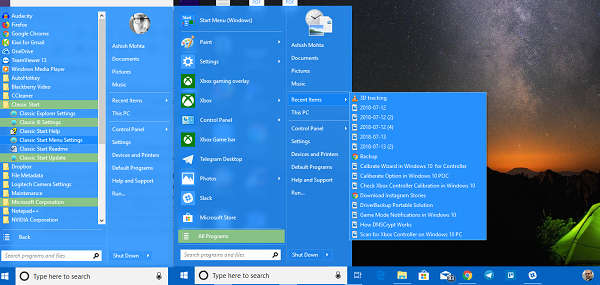
That said, let’s take a look at all the features of Open Shell:
Start Menu Customizations
It offers exhaustive options which let you customize right from the Start Menu to Taskbar to Search Box to the context menu, and so on. You can customize to an extent where you can choose taskbar thickness, add delays to actions, change them, and so on. I am sure you want to, but take this as a challenge, that you will not be able to use all of them.
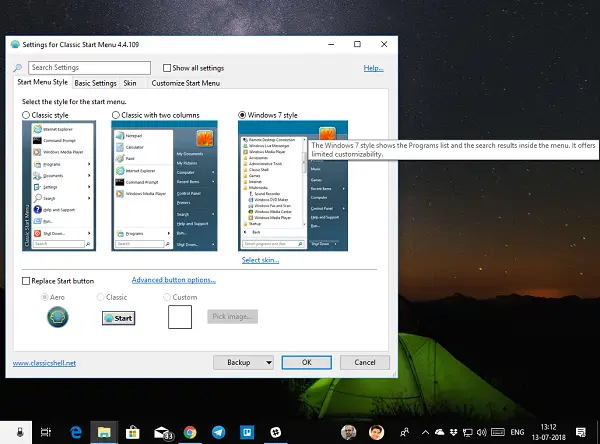
Note: Any modifications you make in the program are highlighted in bold.
Here is the list-
- Start Menu style: Classic, 2-column or Windows 7 Style
- Change Start Button
- Change the default actions to left click, right-click, shift + click, Windows Key, Shift + WIN, middle click, and mouse actions.
- Customize Main Menu option lets you change All Programs style, choose Start menu folder over the pinned menu, remove recent programs completely, change order for recent programs, and lastly enable jumplist.
- Change Delay timer: Any action you take on your PC is delayed a bit mostly for a visual experience. You can change that timer here. It lets you change the timer for Menu, infotip, drag, and drop, and so on.
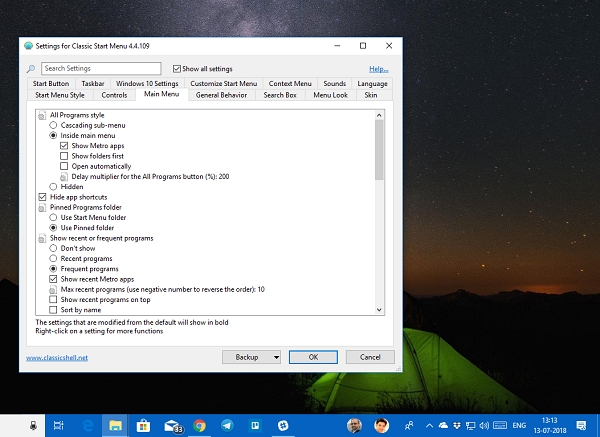
- Search Box Customization: You can either choose to completely remove it if you like to use Cortana to further customize it according to your choice. It lets you change the preference for keyword tracking, autocomplete, search inside apps, and programs, files, and internet.
- Menu Look: Are small icons your style? Do you hate animated transition? Do you want to speed up the animation speed of the menus? This is the place where you need to change.
- Skin: Choose between Metallic, Metro, Midnight, Windows 8, and Aero.
- Taskbar: You can choose between transparent, opaque, and glass look. It also lets you select the color of your choice and texture.
- Customize Start menu Item: Choose between display as a link or menu item or keep it hidden.
- Context menu options let you
- Disable/enable right click with a cascading option.
- Hide new folder, and shortcut
- Disable to prevent opening folders in Windows Explorer
- Disable Pin shell extension.
Read: SystemTrayMenu is a free open source Start Menu alternative for Windows 11/10. It is a handy freeware that you can use to browse and open your files and folders within a few clicks.
Explorer Settings
This section manages settings for Navigation pane, Title Bar, Toolbar settings, Status bar, and File Pane.
Navigation pane:
- Choose between XP or Vista style navigation pane.
- Eneable or Disable horizontal scrollbar
- Disable fade buttons.
- Increase item spacing in tree style explorer.
- Auto navigates to a selected folder either using the keyboard or automatically.
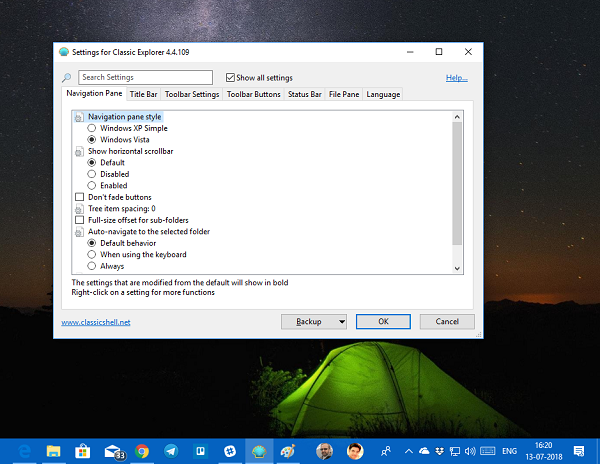
Title Bar: You can disable breadcrumbs, hide the search box, choose additional shortcut for the address bar, and up button.
Toolbar Settings: Change icon size, and text placement, and so on.
Create, and customize toolbar buttons either to add a new item or remove what you don’t use often. You also have the option to customize the status bar and File Pane. The software also offers IE Settings. However, with Windows 11/10, and Edge, IE is gone for good.
Open Shell download
Open Shell is a brilliant program. I have rarely seen software offering so many customizations, and at this level. If you want to get the Old Start menu back, this is what you need to install.
Classic Shell is no longer actively developed. The latest stable version of Classic Shell is 4.3.1 and is available for download on classicshell.net. Classic Start was renamed to NeoClassic-UI and then renamed to Open-Shell. You can download Open-Shell from github.com.
TIP: You can also get Classic Taskbar in Windows using RetroBar.


