
Microsoft has substantially improved the native Defragmenting Utility in Windows, with the release of Windows Vista, and further improved upon it in Windows 11/10/8/7. The defrag engine and the manageability of fragmentation is much better than what existed in Windows XP.
The computer’s hard disk is composed of small fragments in which the data is stored, over time as we change, delete or create files the data gets fragmented and is saved into different fragments though it appears to be the same file. Fragmentation can slow down your Windows PC because the computer will have to look into many fragments for loading up a single file. Read more here about what is file fragmentation and how does it occur in Windows. Disk defragmentation tools unite the data and try to possibly keep them in the same fragments so that the computer performs efficiently.
The inbuilt Disk Defragmenter in Windows now runs as a low-priority task in the background without affecting the performance of the computer. It uses the Task Scheduler to automatically keep the hard disk defragmented, by running when the machine is idle and therefore does not affect the performance of the Windows. Windows will now disable disk defragmentation on SSD system drives as you do not need to defrag a Solid State Drive. In Windows 11/10, SSD Defragmentation is enabled by default.
Read: Do you need to defrag SSD?
The Windows Defragmenter defragments files which are smaller than 64 MB only, for according to Microsoft’s benchmarks, fragments of this size, which already consist of at least 16000 contiguous clusters, have a negligible impact on performance. This means that games and large media files are effectively left as they are! Microsoft feels that to defrag to combine fragments that are 64MB or larger requires significant amounts of disk I/O, which is against the principle of minimizing I/O, and puts more pressure on the system to find large, contiguous blocks of free space.
If you still want to defrag files larger than 64 MB too, you need to use certain other defrag parameters to be able to defragment files of all sizes.
For most, the best practices for using defragmentation in Windows 10/8/7 are simple – you do not need to do anything. But if you feel that you need to have a 3rd party defrag tools to defrag better and/or even defrag very large files easily and quickly, or if in spite of doing your best to troubleshoot the inbuilt disk defrag utility, you are unable to get the inbuilt defrag tool working, you might want to check out these 5 free defragmenting software.
Best Free Defragmentation Software for Windows 11/10
Here is a list of some of the best free defragmentation software for your Windows 11/10 PC:
- MyDefrag
- Piriform Defraggler
- Auslogics Disk Defrag
- Puran Defrag Free
- DiskTuna.
Let us now take a look at them.
1] MyDefrag
This free disk defragmenter for Windows, earlier known as JKDefrag, organizes files into zones, such as directories, Windows files, files used while booting, regular files, and rarely used files. Files that are often accessed are placed at the beginning of the hard disk while the files that are commonly used together are placed in proximity to each other. This organization, results in a dramatic speed increase, thereby allowing the computer to function efficiently.
MyDefrag is completely automatic and can handle USB disks/sticks and floppies.
MyDefrag Features:
- Easy to install
- Fully functional freeware
- Includes a scripting language
- Improved interface
- Offers better optimization
- Consumes less memory
- High speed
- Performs extensive documentation.
2] Piriform Defraggler
This freeware defragmentation utility defragments individual files, groups of files (in a folder) or an entire disk partition, either on the user’s command or automatically on a schedule. Defraggler supports NTFS and FAT32 file systems. The portable application can be used as a replacement for the Windows inbuilt defragment tool since it is faster and offers some additional features too.
Simply select the volume you want to analyze, click on the volume name displayed on the interface and then click the ‘Analyze’ button. The program will analyze the disk volume and display results in seconds. The next step is to click the ‘Defrag’ button to initiate the defragmentation process.
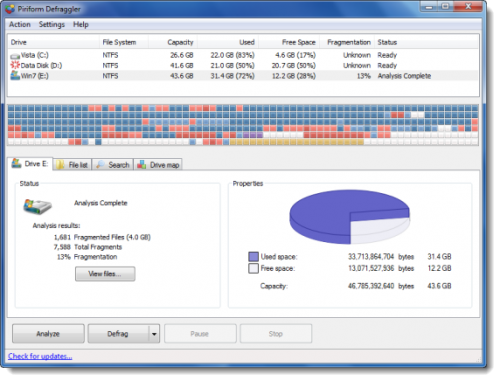
Piriform Defraggler features:
- Gives your hard drive a quick touch-up
- Organizes empty disk space to prevent fragmentation
- the software can be programmed to run daily, weekly or monthly
- Windows OS and Multi-lingual support
- Supports 37 major languages
3] Auslogics Disk Defrag
One of the best known in the free defrag software space is Auslogics Disk Defrag. This tool defragments and re-arranges files to ensure the most efficient file placement. The program not only defragments files but optimizes your hard drives’ file system also to gain higher performance. It supports both FAT 16/32 and NTFS file systems.
Auslogics Disk Defrag’s optimization algorithms allow you to defragment free space, move system files to the fastest part of the disk and clear the MFT Reserved Zone from regular files. Plus, the tool is supplied with a powerful engine that can easily defragment large multi-terabyte.
Auslogics Disk Defrag features:
- Consolidation of free space
- Efficient and smart placement
- Single file or folder defragmentation
- Lists fragmented files
- Auto-defrag mode
- Multiple language support.
4] Puran Defrag Free
The simple defragmentation utility collects all the fragments of a file and puts them together, thereby upgrading the hard disk performance. Its intelligent optimizer i.e. Puran Intelligent Optimizer (PIOZR) boosts the system’s speed. The program can be used in several distinct ways and includes some useful features and configurable options.
Puran Defrag is free for personal and non-commercial use only. If you’re using Puran Defrag in business, you must purchase a license.
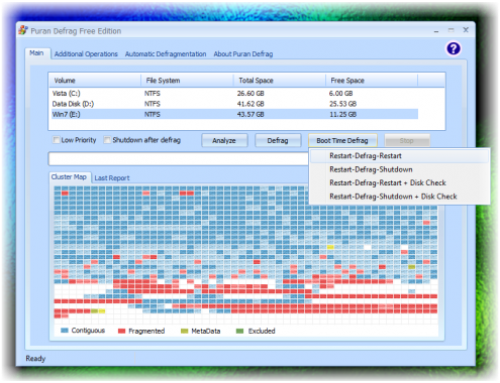
Puran Defrag features:
- Puran Intelligent Optimizer – PIOZR
- Directories Consolidation for a speed boost
- Optimization by Freeing Space
- Automatic Defragmentation for worry-free defrag
- Boot Time Defragmentation for system files like MFT
- Low Priority Defrag for work
- Individual File/Folder Defrag for selective defrag
- GUI and Console Command Line Defrag Supported
- Restart/Shutdown after Boot Time Defragmentation
- File/Folder Exclusion or exclusion by wildcard facility
- Native support for 64Bit Windows.
There are others too like DiskTuna and SuperEasy Live Defrag as well that you may check out.
So which one’s your favorite? Or do you prefer to depend only on the in-built Windows Defragmentation Tool?

