
We have already covered many useful free images editing software. Another one being added to the list is Artweaver. It is a simple freeware program that allows you to simulate natural brush effects, add artistic effects, and more to your images and paintings.
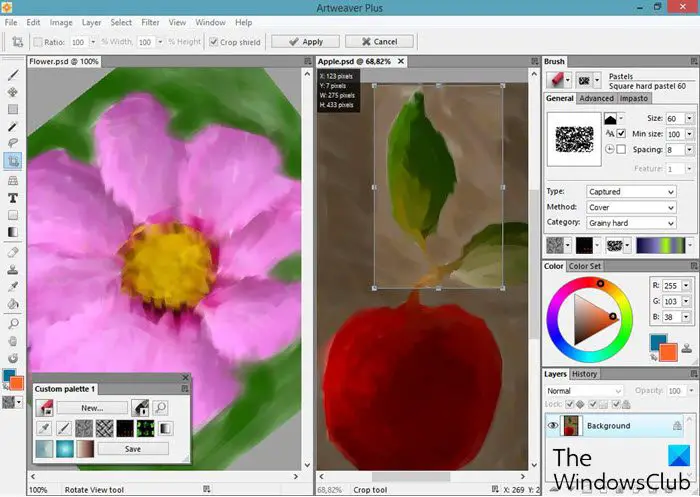
Artweaver Free Painting Program and Image Editor
The useful graphic editor with its comprehensive kit of artistic effects allows users to create sketches from photography and experiment using a wide range of brushes. The brush simulation is tried to be kept as realistic as possible. Each brush has its tweak and settings to create all sorts of desired effects. Besides, there are plenty of adjustment settings available to customize the default brushes or create new brushes.
The free edition includes standard image editing tools like gradient, crop, fill, and selection tools, many brushes, allows Saving and playback of events, arrangeable palettes, many image and effect filters, support for pen tablets, and provides for Virtual memory management.
Artweaver provides a lot of effect filters that can be applied for editing images. These include,
- Sharpen
- Blur
- Emboss
- Mosaic oil effect and many more
It is also able to import and export graphics in different formats. The most common file formats supported are AWD, BMP, GIF, JPEG, PCX, TGA, TIFF, PNG, and PSD. The program offers layers, group layers, and support for the PSD file format for professional users.
Features of Artweaver Free
- New layer properties dialog with more settings
- New Filter: Filter Gallery
- Few filters now show a real-time preview directly in the document
- New brushes: Warping and Coloring
- New command to capture Image stamps
- New command to deskew images automatically
- New views for all preset selectors: List and Thumbnail
- Work together on the same document with other artists over LAN or the Internet.
- Support for layers, layer groups, blend methods, and transparency.
- Support for pen tablets including pressure, pen erasers and Tool-ID
- Extensible by Plugins to enlarge functionality
- Industry-standard image editing tools like gradient, crop, fill, and selection tools.
- Event playback progress.
Pros
- A wide selection of brushes
- Plug-in support
- Layers and transparency
Cons
- The free edition includes limited tools for photo editing
Note: Artweaver Free installation program includes the latest English and German versions, allowed to be used only for non-commercial and academic purposes. You can check the difference between the free and paid version on their website to understand the limitations.
The program is fully compatible with Windows 11 and Windows 10. You can download it here.
Other similar posts you may also like to read are Photoshop Clone Tool Alternatives, Image Tuner, Paint.NET, and GIMPShop.
Is Artweaver free safe?
Yes absolutely! Artweaver is 100% safe and clean and does not push any PUPs. Go agead and enjoy using this free image editor.
Does Windows have a Photo Editor?
Photos App is a brilliant addition in Windows that delivers complete image editing, and also supports 3D objects. If you are not looking for Adobe Photoshop-level editing, this built-in editor can definitely give you a lot more than MS Paint.

