
Keyboards are quite handy if you need to do something quickly. If you visit a particular website often, then you can even create a keyboard shortcut, so that every time you click on it, your favorite website will open in a browser window. To accomplish this, follow the procedure below.
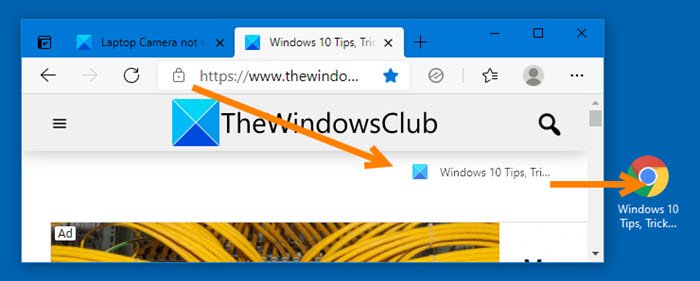
How to create Keyboard shortcut to open website on Windows PC
- Open your favorite browser, eg, Chrome, Edge, Firefox, etc.
- Next, open the website whose keyboard shortcut you want to create.
- Drag and drop the website favicon onto your desktop.
- Right-click on the shortcut and select Properties.
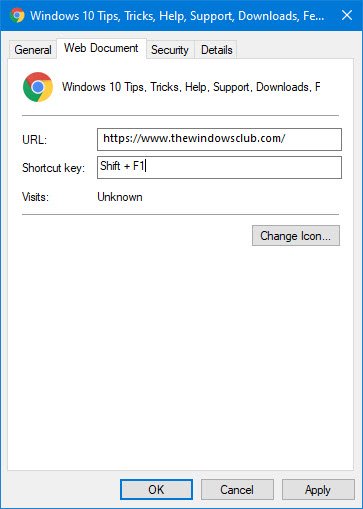
- Open the Web document tab
- Place the mouse cursor in the Shortcut key field and click on the keyboard shortcut of your choice
- The keyboard shortcut will appear in the field.
- Click Apply and exit.
This post will show you create how to create a desktop shortcut to open website.
If you are using Internet Explorer, click on Favorites and right-click a favorite website, whose keyboard shortcut, you want to create.
Select Properties. Now in the Properties box > Web Document tab, place your cursor in the Shortcut key panel.
Click the preferred shortcut key/s (say Shift+F1) on your keyboard. These will get displayed in the panel.
Click Apply > OK.
Now click the keys Ctrl+F2, and you will find your browser opening the website.
Hope you find this small tip useful.
How to open a website with a keyboard shortcut?
To open a website using a keyboard shortcut, press Ctrl+L or F6 to focus on the address bar of your web browser. Then, type the desired website’s URL, like www.bing.com, and press Enter to navigate to that site. This method allows for quick access to websites without the need for a mouse.
How to create a custom keyboard shortcut in Windows 11?
To create a custom keyboard shortcut in Windows 11, right-click the app icon and select ‘Properties.’ Go to the ‘Shortcut’ tab, then find the ‘Shortcut key’ field. Enter your desired key combination starting with CTRL or a function key. Click ‘OK’ to save the shortcut, allowing quick access to applications.
