
Window Manager is a software application used to streamline your workflow by providing users with various functions to manage multiple windows efficiently. A Window Manager is the most reliable and simple productivity tool that simplifies the tedious task of window arrangement while working with multiple monitors and ultra-wide monitors with a variety of functions both on keyboard and mouse. Whether you work with programs, visual information, or textual contents, the Window Manager helps to manage multiple windows by efficiently making use of every pixel on the computer screen. In this article, we round up some of the best free Windows Manager Software for Windows 11/10 PC.
Free Window Manager software for PC
The Window Manager is a perfect window enhancement tool used to manage desktops in a multi-task environment, allowing users to spend less time switching and resizing windows. With the help of Window Manager, users can easily customize the window arrangement according to their usage. The Window Manager software offers several features and advanced actions to the standard window menu, wherein users can customize their favorite and most frequently used windows. For instance, the Window Manager can restore the windows and programs to their previous position and size. It can maximize or minimize specific windows, lock the favorite window to the top, minimize new and current windows to the system tray, make windows transparent, align windows to a specific position, and more.
1] WindowManager
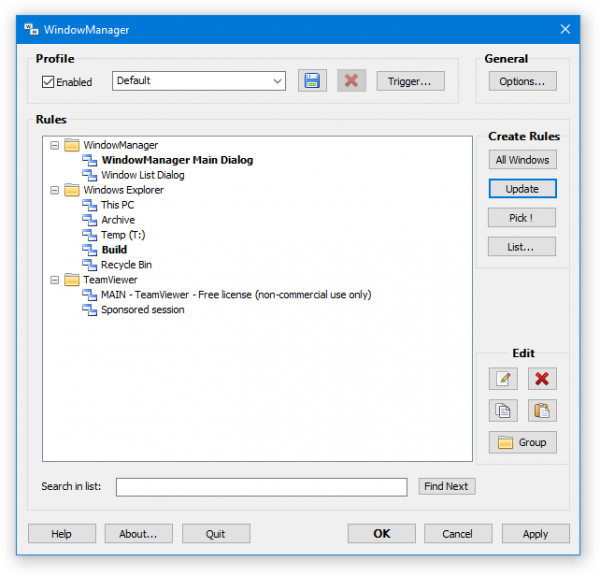
WindowManager is a free productivity tool that enhances the standard window menu with a variety of features. The tool supports programs, windows, Explorer, textual, and dialog-based applications. The tool can be used to lock the last position and size of the window, allowing you to restore it to its previous arrangement. The full customization tool supports almost all versions of Windows and is specifically designed for Windows 11/10. It supports a multi-monitor environment and all the advanced features like maximizing or minimizing specific windows, locking the favorite window on top, minimizing new windows as well as current windows to the system tray, making the window transparent, aligning the window to a specific position, etc. Window Manager also supports silent installation and uninstallation of a program for mass deployment. Additionally, it supports multi-profiling and Hotkey. Get it here.
2] WindowPadX

The WindowPadX is an extended version of Window Pad that comes with enhanced window arrangement features. The tool can be used to remember and lock the last position and size of the window to restore them to the previous window arrangement. The tool offers some easy customization for handling windows. It supports almost all versions of Windows and provides advanced actions to a multi-monitor environment, such as minimizing all windows on a screen, grouping windows, and moving windows between screens. With the help of Window PadX, users can easily configure hotkeys to perform general window actions like maximize or minimize specific windows, lock the favorite window on top, minimize the new windows as well as current windows to the system tray, make the window transparent, align the window to a specific position and move the mouse to resize a window based on “pad” concept. Users can also configure hotkeys to perform mouse actions like moving the mouse to the center of a monitor, toggling the clipping cursor to the current monitor, etc A program for mass deployment.
3] AquaSnap
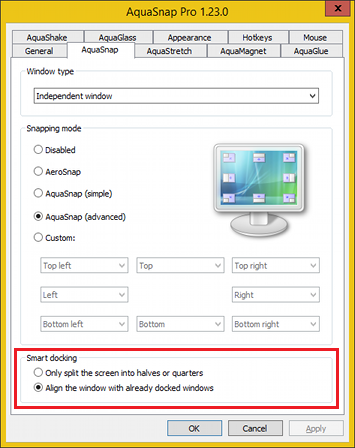
AquaSnap is most reliable productivity tool if you are working with multiple monitors and windows. It eases the tedious task of window arrangement, allowing you to use multiple windows and programs simultaneously, thereby streamlining your workflow. Aquasnap features include Window Docking, Window Stretching, Window Shaking, Window Tiling, and Window Snapping. Users can easily maximize or minimize specific Windows, lock the favorite window to the top, minimize new and current windows to the system tray, make windows transparent, align windows to a specific position, and move windows together, among other features. The tool is compatible with all Windows versions, and a freeware version is available for personal use.
4] Auto Window Manager
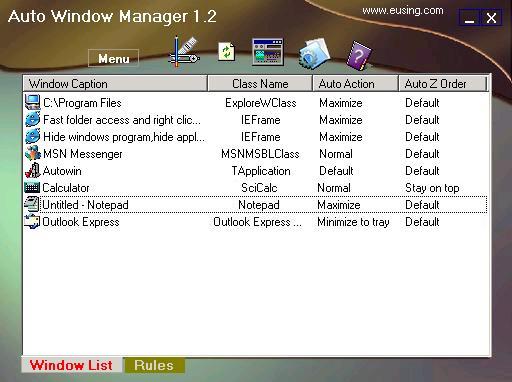
Auto Window Manager is a window management utility with several menu items that are enhanced to the standard window system. The Auto Window Manager automatically manages all the windows you specify. Users can automatically maximize or minimize specific Windows, keep their favorite windows locked on top of the screen, minimize the new and current windows to the system tray, automatically add window transparency, etc. Auto Window Manager is a free utility compatible with all versions of Windows. Download it here.
I hope you find the list useful!
