
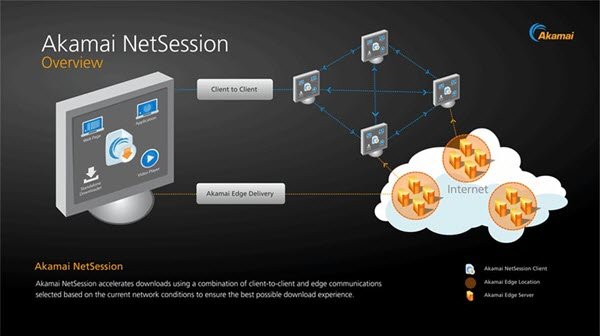
When you try to download a large software or application from the Internet, the role of the Akamai NetSession Client comes into play. The client comes pre-installed on your PC or bundled with the program you are installing, and claims to boost download speed and reduce download time. Owing to this reason, the tool is used by many software and media publishers to deliver files or streams to you. Many have no clue about it and thus have apprehensions about how it works.
Akamai NetSession Client
The reason why it is not readily visible is that, in most cases, we check the ‘I agree’ box of the License Agreement without entirely reading it. So, if it comes bundled with software, we install it unknowingly and mistaken it for a virus, later.
In this post, we will try to discuss the following:
- What is Akamai NetSession Client?
- Is Akamai NetSession Client a virus?
- Is it safe to remove Akamai NetSession Client?
- How to stop or uninstall Akamai NetSession Client?
Let’s get started and discuss the topic in a bit more detail!
What is Akamai NetSession Client?
Akamai is primarily a download manager that allows users with slow connections to download large files at a slower rate. Says its developer:
We’ve designed NetSession Interface to reside on your machine with negligible impact on memory, CPU capacity or disk space. Its purpose is to improve the speed, reliability and efficiency for downloads and streams, and to do that securely and without violating your privacy or intruding on your computing.
Is Akamai NetSession Client a virus?
The NetSession Interface has been designed with the purpose of improving the speed, reliability, and efficiency for downloads and streams. It does not infect your machine with spyware, adware, or a virus as such – but it will monitor some aspects of your usage, and thus some may consider it as an undesirable activity and want to remove it.
The legit file is located in the C:\Users\<username>\AppData\Local\Akamai folder. If it is located n any other folder, it could well be malware and you should run an antivirus scan right away.
Is it safe to remove Akamai NetSession Client?
The developers of the system say that NetSession only uses your computer when it is ‘idle’ or utilizing minimal network resources. This means it can continuously monitor your network usage and send that information to Akamai. If you do not quite like it, you can have Akamai NetSession Client removed.
How to stop or uninstall Akamai NetSession Client
You can easily stop the NetSession interface to see what difference it makes when removed. However, if it’s downloading or streaming data to your computer, it will be interrupted. You may have to restart your computer to resume.
To temporarily stop NetSession, open Control Panel > Akamai NetSession Interface applet > System Preferences. Select the Preferences tab. Under Service, click the Stop button.
You could also stop it via Task Manager. Locate and terminate the netsession_win.exe process. Press Ctrl+Shift+Esc to get started.
To uninstall Akamai NetSession, Open Control Panel > Programs & Features and uninstall the Akamai NetSession Interface here.
If that does not help, open a command prompt in its installation folder mentioned above, type the following and hit Enter:
admintool.exe uninstall -force
Although it is still used, the days of Akamai are believed to be numbered as people around the world have fast broadband connections and speedy browsers like Chrome, Firefox, and Microsoft Edge. They are considered as a better system to deal with large files as they can download 1.5 GB file in less than 20 minutes.
Now read: What is IDP.generic virus?
