
If you run a business, you need CRM software. Of the many available products, Salesforce is popular. However, many users have reported that Salesforce doesn’t work with the Firefox browser. If you encounter this issue, read this article for the causes and solutions.
Salesforce not working in Firefox on Windows computer
The issue occurs while trying to access Salesforce on the Firefox browser. The page either doesn’t load or the website is unusable. Try the following solutions sequentially to fix the problem.
- Clear browser cookies and cache files
- Enable third-party cookies in Firefox
- Isolate the cause with add-ons
- Disable the problematic add-ons
- Update Firefox to the latest version
1] Clear browser cookies and cache files
While other solutions will be more helpful, before proceeding further, it has to be made sure that the browser cookies and cache files are cleared. The reason is that if these files are corrupt the website will not load properly.
2] Enable third-party cookies in Firefox
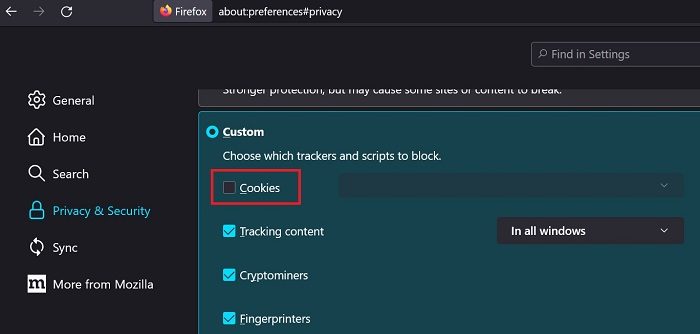
Firefox blocks some cookies by default. While this is for security reasons, the setting causes problems with websites. In case you encounter the issue mentioned here, please enable third-party cookies on the Firefox browser. The procedure is as follows:
- Open Firefox.
- Click on the Application Menu button at the top-right corner of the browser.
- Select Settings form the menu.
- Go to the Privacy & Security tab on the list on the left-hand side.
- Select Custom.
- The first checkbox will be Cookies. Please uncheck it.
- Restart the Firefox browser.
3] Isolate the cause with add-ons
In many cases, add-ons in Firefox can also cause these problems. To isolate the cause, open Firefox in an InPrivate window. The procedure is as follows:
- Open Firefox.
- Click on the Application Menu button at the top-right corner of the browser window.
- Select New Private window. This will open a window in the InPrivate mode.
- Now, try opening the Salesforce website.
- If it opens, the issue is probably with the extensions. The reason is that the extensions are disabled in the InPrivate window.
Alternatively, you can open the InPrivate window using the keyboard shortcut CTRL+SHIFT+P. Then follow the same procedure.
4] Disable the problematic add-ons

If the issue is with the add-ons, then you can disable the problematic add-ons as follows:
- Open Firefox.
- Click on the Application Menu button at the top-right corner of the browser window.
- Select Settings from the menu.
- Select Extensions and themes from the list on the left-hand side.
- In the window that opens, go to the Extensions tab on the list on the left-hand side.
- You can disable extensions using the associated switch.
Use a trial-and-error method to identify the problematic extension, then remove it.
5] Update Firefox to the latest version
If Firefox is outdated, problems like the one discussed are likely to occur. , it is important to make sure that the Firefox browser is updated to the latest version. The procedure is as follows:
- Open Firefox.
- Click on the Application Menu button at the top-right corner of the browser window.
- Select Help > About Firefox from the menu.
Firefox will automatically update to the latest version.
Related: Salesforce not working in Google Chrome
Is Salesforce not working today?
If Salesforce isn’t working on the server end, no fix will work. To isolate this issue, check whether the server associated with the website is working. The best way to do so is using online website monitor websites. If Salesforce isn’t working on the server end, wait a while before continuing.
Read: Salesforce not working in Microsoft Edge
How reliable is Salesforce?
Salesforce is a reliable CRM platform. It counts among the top ten CRM software products and is usually considered the best for small and medium businesses. However, users prefer it mainly because it eliminates the need for an IT team, saving costs.
