
Why learn Adobe Illustrator? Adobe Illustrator is a very versatile design software that can be used both for personal and business. You don’t have to be a professional or have a vast knowledge of Illustrator to do a lot of things in Illustrator. You can learn the basics, and as you do designs, you will learn and discover more.
Should I learn Photoshop or Illustrator first?
It is better to start with Adobe illustrator first as it has a smooth learning curve. Once you master it, you can move to Adobe Photoshop to learn all it has to offer.
Why learn Adobe Illustrator?
The more you can do for yourself, the more you can use the cash you save for something else. You may also use the skills as another stream of income. Below is a list of things that you can do with Illustrator for Business or Personal. Let me show you several reasons to learn Adobe Illustrator. You can use this powerful software to create:
- Logos
- Business Cards
- Social Media Graphics
- Blog Post Templates
- Poster or Flyer
- Social Media Banners
- Infographics
- Branded Icons
- Buttons
- Thank-you Notes
- Invitations
- Printable Items
- Custom Products
- Newsletter Banners
- Email Signatures
- Facebook Ads
- Brochures
- Handouts or Coupons
- Gift Cards
- Print Ads
- T-Shirts
- Postcards and Mailers
- Signage
- Video Thumbnails
- Stickers
- Media Kit
- Worksheets
- Shelf Organizers
- Welcome Packets
- Digitizing Hand-Lettered Text
- Digital Illustrations
- Children’s Book Illustrations
- Package Designs
- Die Cut Guides
- Book and Magazine covers
1] Logos
Logos are the face and signature of a business. Customers, potential customers, investors, and potential investors can take away a lot from a logo. It is therefore very important to plan and execute a proper logo. However, professional help can be costly, so knowing how to make one can save you money. Another advantage of knowing how to design logos is that you can evaluate logos made by others to see whether they make sense.
2] Business Cards
Business cards are little summaries of your business that you hand out to potential clients. Business cards matter because you can easily give them to potential clients so they have your business information for later. Getting your business card to the right person at the right time can mean getting lifelong clients. If your business is good, people will continue to advertise for you. One business card to the right person can go a long way. Learning to make your own business cards, or making business cards for extra income, can be very helpful.
3] Social Media Graphics
Illustrator is great not only for printed items, but also for designs used online. You can use Illustrator to create social media graphics for your business or personal use. Illustrator can create the same design in multiple sizes so it fits any social media site. Creating catchy social media graphics will be more attractive than plain text and you will soon have more likes and followers.
4] Blog Post Templates
Templates are great for business and personal use. They make life easier because they save time. For each blog, you just change the picture and words and post. Templates are also good to use because it keeps texts and designs uniform and consistent across all platforms.
5] Poster or Flyer
Posters or flyers are great ways to advertise your business or for personal use. You can distribute them in print or digitally. They can be used to advertise events, promotions, or any other information that you want people to know. You can design them in Illustrator and print them at a print shop or on your own printer.
6] Social Media Banners
You can use Illustrator to create professional-looking banners. Illustrator can create uniform, cohesive banners so your social media accounts have a consistent look.
7] Infographics
Here is something that may or may not surprise you, if you put your information or blog as a graphic of your social media account, it will get more reads and shares. Infographics are more interesting and grab attention quicker than regular text blogs. For example. Graphics are easier for the brain to read and process than text. Infographics use graphics to represent words, so it is easier for a person scrolling through to get the message. Another point is that we all secretly love reading books and information with pictures. A blog or content that is straight text will be less attractive than one that is a mixture of text and graphics. That said, it’s easier and cheaper to make your own infographics for your blog.
8] Branded Icons
Branded icons are a great way to add life to your website or blog site. Branded icons are little pictures that represent words. They can be used to represent categories on your website or blog site. For example, a hardware website may use branded icons that look like hardware items to be linked to different categories of items. This visual representation can add some interest to the website and people will easily find what they are looking for. Branded icons can also leave a lasting image in a person’s mind, and they will always remember your blog or website.
9] Buttons

You can spice up your website or blog site by creating little buttons. You just need to use Illustrator to create custom buttons, place them on the website and add a URL so that when clicked they will take the user to another section of your website.
10] Thank You Notes
You may have people who have helped you in some way, or great clients you want to thank. Using Illustrator to create a great thank you note is a nice way to reach out and show appreciation. People will appreciate it more when they see the care you took in creating the thank you note.
11] Invitations
At some point, everyone will have an event and will want invitations. You may also have family members and friends who need invitations to a wedding or another event, and you can contribute by using Illustrator to make them.
12] Printable Items
Printable items are a great way to show appreciation and get some advertising out. Printable calendars, bookmarks, and other items can show appreciation and advertise your business.
13] Custom Products
Custom products are a great way to add some personality to your items. Some companies let you send in your design, and they add it to items like mouse pads, bags, and other products; these can set your business apart or make your home gaming station look good. Illustrator can be used to design the graphics and you can have the company print them. There are also home small home print and transfer machines that can be used at home to customize your products.
14] Newsletter Banners
You may have a newsletter that you send out digitally or in print. You can use Illustrator to create a nice banner for your newsletter.
15] Email Signatures
An email signature is a great way to add some personality to your email. It can also be a great way to add advertisements to your email. You can use Illustrator to create a nice custom email signature. The email signature can be made to have a link so that when it is clicked it takes the user to a web page of your choice.
16] Facebook Ads
You can use Illustrator to make the ads that you want to put on Facebook. You can create multiple variations of the same design so that you have multiple options to choose from. When someone else designs them for you, it can be a pain to have them create multiple designs for you to choose from, and it may be expensive too.
17] Brochures
Brochures are great ways to get information out. They are small and can be designed in so many ways. You can design them in different colors and folds to suit your taste.
18] Handouts or Coupons
Your business may have a physical location or even be online. You can use Illustrator to design handouts or coupons to attract customers. The handouts may be advertising a grand opening or sale or a way to sensitize persons about your business. Coupons may be offering discounts and free items if the coupon is shown at the store or if the code is used online. Handouts and coupons are great ways to reach people who may not be very tech-savvy and who may prefer the physical store and paper.
19] Gift Cards
Gift cards are a great way to attract clients and treat family members. You can get clients or family members to choose their own gifts for birthdays. Weddings, anniversaries, and other occasions. Businesses can use gift cards to reward loyal customers or apologize for a bad experience. It is an advantage to use Illustrator to design the look of your gift cards.
20] Print Ads
Lots of people are moving to digital advertising. However, print advertisements still have customers. Lots of people still enjoy the feel of paper and they will not mind printed ads. The local newspaper can be a great place to use printed ads as inserts to reach readers. Illustrator can be used to design these printed ads to reach these customers.
21] T-shirts
There is a trend going around where people can design T-shirts and sell them online. They just need to design, and the website will print and send out when the customer buys. Being able to do great designs for the t-shirts will attract more people to buy. You can also print your own t-shirts at home with your own designs. You just need a computer, Illustrator, an inkjet printer, a heat press, or your iron and transfer or sublimation paper. You would be surprised how well you can design and print some great t-shirts that could eventually be a business. T-shirts are a great way to advertise your business and get people to advertise your business. You can use Illustrator to design and print your t-shirts at home for the next family reunion. You can outline T-shirt mockups with a picture or logo in Illustrator to get a sense of what the finished product will look like.
22] Postcards and Mailers
Postcards and mailers are great ways to get the word out there about an event or product you want people to know about. You can use Illustrator to design these and send them out to people. You can share your next vacation with friends and family members by taking interesting photos and using Illustrator to make postcards to share.
23] Signage

Signs need to be big and stand out so that people can see them. Illustrator is great for signage because Illustrator creates vector images and vector images can be made very large without getting pixelated. This makes Illustrator great for signage.
24] Video Thumbnail
Video Thumbnails are more important than you might think. Video thumbnails are what people see when they look at a video before playing it. The video thumbnail gives the viewer an idea of what the video is about. A good video thumbnail will attract more viewers. Go to YouTube and you will see that you view the thumbnail before you watch the video.
25] Stickers
Stickers are great to make and to have. They can advertise your business or personalize your water bottle, laptop, bags, books, or almost anything. Learn to use Illustrator and you can make your own stickers for business or personal.
26] Media Kit
Illustrator is a great program to use when you want to make your media kit. A media kit is a collection of important information that media that is advertising your brand would need. A media kit includes your logo, product photos, and anything else the media would need. The media kit will need graphics to match the information it contains, and Illustrator is the right tool to create impressive graphics.
27] Worksheets
Whatever your field of work, you can create worksheets using Illustrator. Whether you are a teacher, blogger, or service-based business, Illustrator can help you put together your worksheet.
28] Shelf Organizers
From a large warehouse to your kitchen cupboard, who doesn’t hate to see clutter or things where they are not supposed to be or can’t find them at all. Illustrator can be used to create cards to organize shelves. These shelf organizers will help workers or your family members out things where they belong and know where to find them. They save the hassle of wasting time looking for things all over the place.
29] Welcome Packets
Every organization will have to welcome new members at some point. Making the new members feel welcome is a good start to making them feel at home. Illustrator is a great program for creating attractive welcome packages that help new members feel welcome.
30] Digitizing Hand-Lettered Text
Those who are artists and write beautiful hand-lettered texts with or without a stencil can now use Illustrator to digitize them. Just draw on any surface, take a picture or scan if possible then use Illustrator to draw over the text and turn it into a vector that can be easily reproduced for digital or print media.
31] Digital Illustrations
Children’s books are great places for illustrations, and with the rise of digital books, there is a need for digital illustrations. Illustrator is the perfect program for creating digital illustrations. Digital illustration is great for those who may not be able to draw on paper but are interested in art. Illustrator is a great way to make art.
32] Children’s Book Illustration
Illustrator is a great tool for creating illustrations for children’s books. Children are visual readers as well and their books must have interesting pictures to keep them interested.
33] Package Design
Designing product packaging is a great way to use Illustrator. Packaging is very important and no matter how good the product is, if the packaging is not well done, customers will not be attracted. You may have some great ideas for your product packaging and being able to make your own is very good.
34] Die Cut Guides
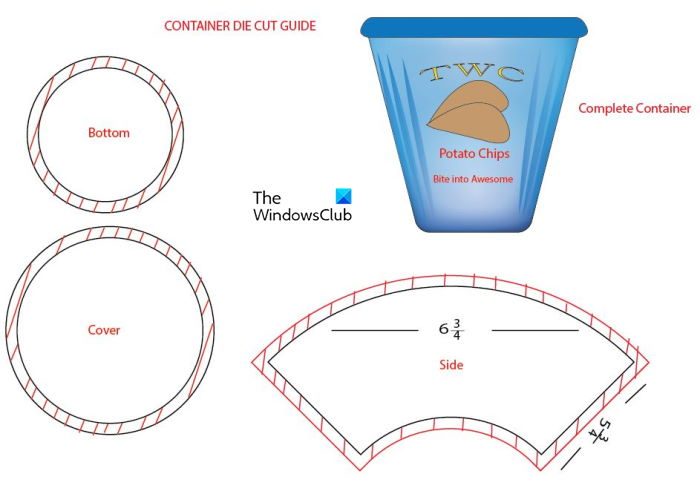
We go to the stores, and we pick up a carton of ice cream or a box of biscuits, but we never actually know how the package was made. To make large amounts of packages uniformly, manufacturers use die. Dies are metal blades shaped like the item to be made. The die is then placed on the paper or cardboard and pressed down, and it cut the paper or cardboard out. The die is made to cut out all the sections, including the parts that are glued, that we don’t usually see. Illustrator can be used to make the die-cut guides for making the die that will cut the package. Here are a few things that are made using dies– envelopes, pizza boxes, paper bags, wedding invitations, and many other everyday items.
This is the Die-Cut Guide for a container used for ice cream or other products. The wider outer edges with red lines show the package manufacturer where to apply glue, perforate, or fold.
35] Book and Magazine Covers
Whether for business or personal use, Illustrator can create great book and magazine covers. Even if you aren’t the one printing the covers, you can still design them. There is a satisfaction that comes with seeing your handiwork on display.
Read: How to make a Flat Image look 3D in Illustrator
What is a die?
A die is a shaped metal tool with a sharp edge used to cut items into a specific shape. It is like a template of what the item is supposed to look like. Dies are used for cutting many things that need to be in a certain shape. For example, if you have pizza boxes to cut you could make a die in the shape of the pizza box when it is folded out flat, then use the die to cut cardboard in that shape and then fold it to form the box.
How can I learn to use Illustrator?
You can learn to use Illustrator by acquiring the software and enrolling in a school that does graphics. You can also learn Illustrator by visiting thewindowsclub.com, where I will be posting how-to articles and other Illustrator articles. There are also sites that do paid or free courses, and Illustrator is one of the courses offered. You can also learn more about using and making things with Illustrator on YouTube.
How long does it take to learn Illustrator?
Learning the basics of Adobe Illustrator takes less than a month. Mastering the software and becoming a pro takes about 6 months.
How can I draw my art in Illustrator?
The cheapest way to draw your art in Illustrator is to draw it by hand first, then take a photo with a digital camera or phone and upload it to your computer. You may also scan the art onto your computer with a regular scanner. You then open the art in Illustrator, and you can trace over it with the Pen Tool. Put the art on one layer, double-click that layer in the Layers window, then click a template; Illustrator will automatically dim the image to about 50%. You can dim the image even more if you like. Dimming the image makes it easier to trace over. Then use the Pen tool or other tools and shapes to trace over the image. When you are done tracing over the image you can remove the original and add colors to the traced image.
You can also use a graphic tablet or drawing tablet to draw directly in Illustrator. This is more expensive because these tablets can be quite costly. However, these tablets make it easier to draw and color directly into Illustrator.
What jobs can I get after learning Illustrator?
Many jobs could use the skills learned in Illustrator. People with Illustrator skills could work as illustrators for storybooks. Illustrator would also be a plus in a marketing position as it would allow the person to be able to design and critique advertisements and marketing campaigns. Illustrator would also be handy for product packaging design. Illustrator would also be a plus for book and magazine design. Illustrator is usually one of the skills a good graphic artist learns. Persons with Illustrator skills could design advertisements for social media and print campaigns.
What jobs can I get after learning Photoshop?
After learning Photoshop, you could get a job as a graphic designer for an organization or use this skill to be self-employed. Photo studios usually need people skilled in Photoshop to retouch photos before they are printed. They also need people to design portraits and add decorations or backgrounds to clients’ pictures. Photoshop skills would be quite handy to design business stationery, business cards, logos, printables and so much more. Usually, Photoshop skills make it easy to work as a freelance graphic artist or are a great asset as a marketing consultant. Did you know interior decorators also use Photoshop to create mockups of projects they need to design? This helps them see their ideas before they start the actual work.
Now read: Reasons why you should learn Photoshop.
