
We cannot install anti-virus software if we already have one. So, if you have Norton on your Windows PC and want to install another antivirus program, you first have to remove the Norton products from your PC. While Norton is popular antivirus software that helps protect against viruses and Trojan attacks, many users still want to remove it from their PC. Such an issue is mainly reported by users who have used the trial version of Norton and now want to use some other program.
Though you can simply remove the files and folders via Add/Remove Programs in your Control Panel, you might sometimes need a special tool to remove some specific files. Using such antivirus removal tools can ensure that the security software is completely uninstalled from your computer.
Norton 360 Remover Tool will help you completely uninstall all Norton antivirus and security products & software. It can also help you reinstall them easily. It replaces the Norton Removal Tool. It can remove Norton 360, Norton Password Manager, Norton Internet Security Add-on Pack, Norton AntiSpam, Norton AntiVirus and Norton Confidential Online.
Norton 360 Remover Tool for Windows computer
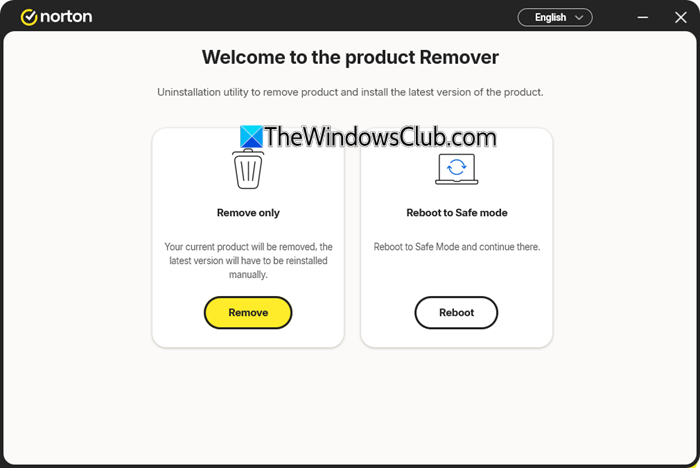
The Norton 360 Remover tool is a utility designed to uninstall, remove, and optionally reinstall the latest version of the Norton device security application on Windows systems.
Depending on the required action, the tool can:
- Remove only
- Remove and reinstall: Uninstalls the current installation and automatically deploy the most recent version of the application.
- Help you reboot to Safe Mode.
Before you begin, make sure you have an internet connection on your PC. Then download the tool and Run it on your PC.
- Click on Remove & Reinstall if you want to install the latest version of Norton
- Click on Remove Only if you just want to remove the Norton products from your PC.
It is a very simple tool that requires no technical knowledge to run or use. Just download the tool and follow the given instructions. The removal process, however, takes some time, but it will remove all the Norton products stored on your PC. The changes take effect after you restart your PC.
You can download it from norton.com.
Overall, it is a simple and useful tool that lets you remove the stubborn Norton products hidden in your PC. Please note that this tool does not remove Norton Utilities, Norton Family or Norton Identity Safe local vault.
PS: More AntiVirus Removal Tools & Uninstallers for popular AntiVirus programs here.
