
Organizations across the globe are now using various Mobile Device Management or MDM services. The need of managing mobile devices peaked. Microsoft Intune is one such MDM service. It is a cloud-based service that focuses on mobile device management (MDM) and mobile application management (MAM).
With the help of Intune, organizations control how the devices are used, including mobile phones, tablets, and laptops. Organizations can also configure specific policies to control applications. To use this service, devices need to be enrolled in Microsoft Intune. However, sometimes the enrolled device can no longer sync with Microsoft Intune. If you are trying to fix this issue of Microsoft Intune not syncing, here are some workarounds.
What happens when Microsoft Intune is not syncing?
Intune is part of Microsoft’s Enterprise Mobility + Security (EMS) suite. Intune integrates with Azure Active Directory (Azure AD) to control access, allowing you to determine who has access and who does not. It also integrates with Azure Information Protection for data protection. It can be used with the Microsoft 365 suite of products. For example, you can deploy Microsoft Teams, OneNote, and other Microsoft 365 apps to devices. This feature enables people in your organization to be productive on all their devices while keeping your organization’s information protected with the policies you create.
When the issue of Microsoft Intune not syncing occurs, there are no errors logged in the event logs. As a result, it becomes difficult for the organization to track any incident that may be potentially harmful.
Fix Microsoft Intune not syncing
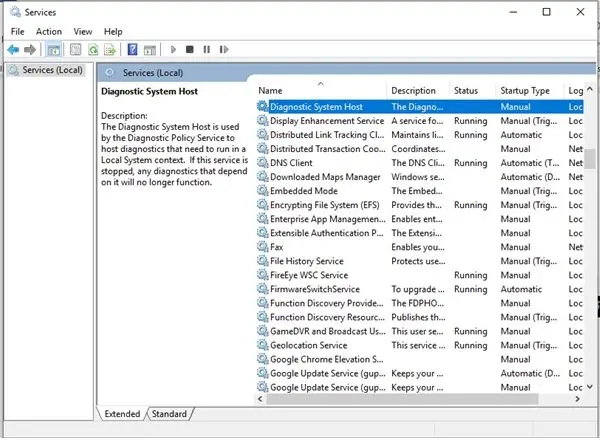
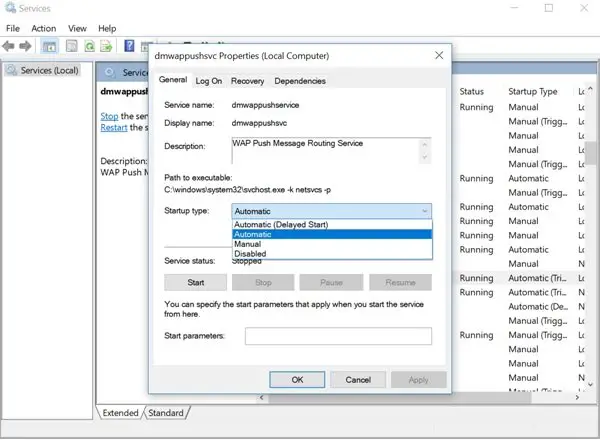
Microsoft mentions that the issue occurs if the Dmwappushservice service is disabled. The Dmwappushservice service is required on the client devices for Intune management. If this service is disabled, the device can’t sync with Intune. Hence, it is necessary to enable the Dmwappushservice service. To do so follow the next steps:
- Go to Start Menu and search for Services app.
- Open the Services app and you will see all the local services available on your PC.
- Now select Dmwappushservice service from this list and open the settings for this service.
- Now change the startup type of the Dmwappushservice service to Automatic.
- Once this is turned to automatic, the issue of Microsoft Intune not syncing will be resolved.
Try this resolution and let us know if it helped you resolve the issue of Microsoft Intune not syncing or you are still facing the same issue.
How do I force Intune to sync?
To force Intune to sync your device, you must manually sync it. It connects the device with Intune to get your organization’s latest updates, requirements, and communications. Company Portal regularly syncs devices when the devices are connected to Wi-Fi. However, if you need to disconnect the device for an extended time, the sync feature ensures that you can get any updates you missed when you return.
Forced syncing can also help resolve work-related downloads or other processes that are in progress or stalled. If you’re experiencing slow or unusual behavior while installing or using a working app, try syncing your device to see if an update or requirement is missing.
Intune supports manual sync from the Company Portal app, desktop taskbar or Start menu, and the device Settings app.
How long does it take for Intune to sync?
The time required for Intune to sync depends on the platform. Initially, as soon as Intune is deployed on a device, the device is notified to check in with the Intune service for any new policies or updates. If the device does not respond, the same action is performed three more times. If the device is unable to receive any of these notifications, it will obtain the policy or profile during its next scheduled check-in with the Intune service. The same applies to checks for non-compliance, including devices that move from a compliant to a non-compliant state.
How often do devices sync with Intune?
The estimated Refresh cycle frequencies for different platforms like for Windows, Android, macOS, iOS/iPadOS is about every 8 hours.
