
Windows introduced a new security construct called Mandatory Integrity Controls (MIC), which is similar to integrity functionality long available in the Linux and Unix worlds. In Windows Vista and later versions like Windows 11/10, all security principals (users, computers, services, and so on) and objects (files, registry keys, folders, and resources) are given MIC labels.
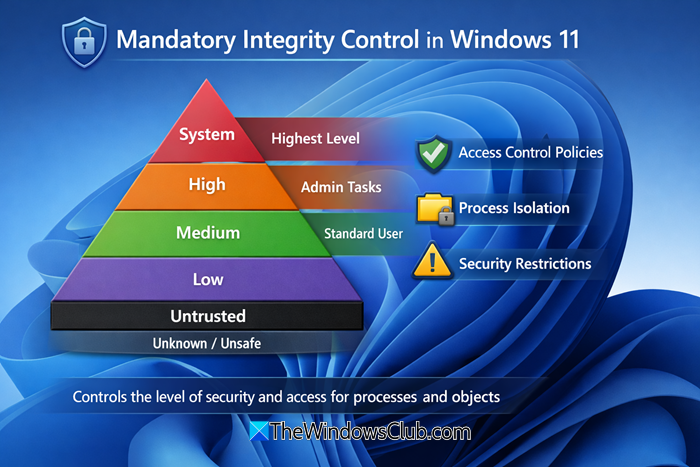
Mandatory Integrity Control in Windows 11
Mandatory Integrity Control (MIC) provides a mechanism for controlling access to securable objects and helps defend your system against malicious Web content, provided your browser supports it.
The purpose behind integrity controls, of course, is to give Windows another layer of defense against malicious hackers. For example, if a buffer overflow can crash the browser (and not a third-party add-on or toolbar), the resulting malicious process will often have Low integrity and be unable to modify Windows system files. This is why so many browser exploits have resulted in an “important” severity rating for Windows but a higher “critical” rating for Windows XP.
The Browser Protected Mode (IEPM) is built around mandatory integrity control. The IEPM process and extensions run at low integrity and, therefore have write access only to the Temporary Internet Files\Low folder, History, Cookies, Favorites, and the HKEY_CURRENT_USER\Software\LowRegistry key.
While it’s completely invisible, mandatory integrity control is an important advance in maintaining the security and stability of Windows OS.
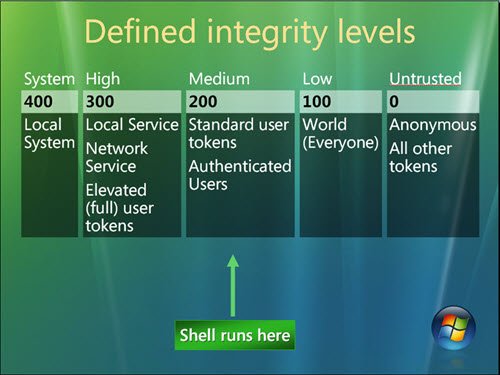
Windows defines four integrity levels:
- Low
- Medium
- High
- System
- Untrusted.
| Level | Typical Use | Description |
|---|---|---|
| System | OS kernel and critical services | Highest privilege; can modify anything |
| High | Administrator tasks | Elevated rights for system management |
| Medium | Standard user applications | Default level for most user processes |
| Low | Restricted apps (e.g., browser sandbox) | Limited access to prevent system changes |
| Untrusted | Unknown or unsafe code | Cannot interact with most system objects |
Standard users receive medium, elevated users receive high. Processes you start and objects you create receive your integrity level (medium or high) or low if the executable file’s level is low; system services receive system integrity. Objects that lack an integrity label are treated as medium by the operating system—this prevents low integrity code from modifying unlabeled objects.
We hope this helps.
