
Most people who own desktop computers tend to have the case with the power supply placed on the floor. Rarely do we see a home set up where the case is sitting on a desk or on anything other than the floor. The question is, should computers be placed on the floor or carpet in the first place? Well, there is no problem with doing so, but it all depends on the situation, and that is key.
Is it OK or Bad to place your PC on the floor or carpet?
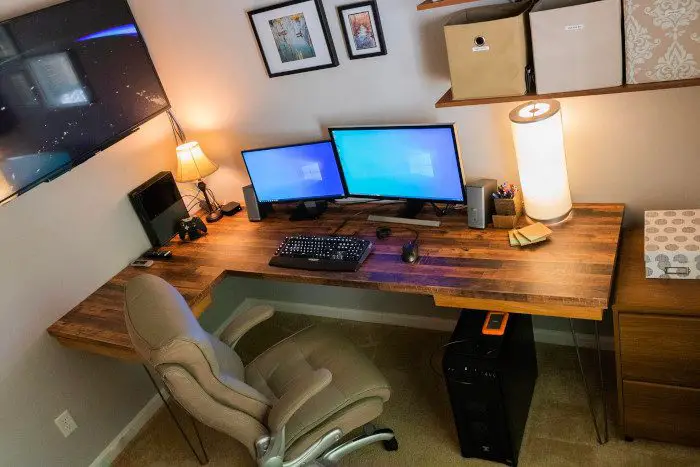
Do not put your PC on a carpeted floor
A lot of people these days have carpeted floors. Some people believe it is a better option than a hard-surface floor because it provides a cushioning effect that helps prevent joint injuries. Not only that, but carpets can also prevent back pain as well.
Additionally, if you want to reduce noise, having a carpet will help, as the padding it provides reduces noise.
Now, as for why users must not place their desktop computers on the carpet, well, many of them these days have tiny feet due to vents on the bottom. Older cases usually had no vents, so they could sit flat while relying on vents on the sides and rear to keep cool.
If you place your modern desktop computer case on a thick, fluffy carpet by design, the vents below will be clogged, which could cause overheating.
Carpets can generate static charges, which pose a risk to sensitive electronic components.
In a situation where you have a short carpet, the computer could survive just fine, but it will depend on the size of the legs to keep it off the carpet and leave enough space for proper airflow.
Desktop computers will take in more dust on the floor
If you have your PC on a hard floor, there is a high chance the floor will accumulate dust, and that dust will find its way into your computer. We should state that dust will penetrate your computer no matter where you put it, but on the floor, there is a higher chance of your desktop PC sucking in more dust than ever.
So, what can you do? Well, you will have to clean the area around your desktop PC regularly. Since it’s not a laptop, we assume it’s a lot easier to pull down. From there, get yourself an air compressor and go to physically clean your computer, mouse and keyboard.
As it stands, we can say for certain that placing your desktop PC on the floor does not harm the hardware. However, please avoid carpets and ensure the device is cleaned regularly, preferably once per week if you can find the time.
We wouldn’t recommend the floor if you have other options. But since not everyone can afford a desk or specialized computer hardware, the floor will always be the primary choice. Still, we must say that a low-power computer is perfect for the floor rather than a gaming rig.
Conclusion
Placing your PC on the carpet or directly on the floor is not recommended. If space is limited, use a PC stand or riser to elevate it a few inches above the ground. This simple step can extend your PC’s lifespan and improve cooling efficiency
Read: Things that can damage your Computer and shorten its life.
What is a desktop computer?
OK, so a desktop computer is a computer that is designed to fit on or under a desk. Such computers rely on peripheral devices for interaction. The devices in question are usually a keyboard, mouse, and monitor. Very different from a laptop, where all the key components are part of a single package and can be moved around with ease.
Read: How long does the average Windows PC last?
Can a laptop be used as a desktop?
In some situations, yes. For example, laptops with screens over 17 inches are usually deemed as desktop replacements due to their size. Furthermore, if you attach a keyboard, mouse, and an external monitor to a regular laptop, then it is classed as a desktop.
Read: Laptop vs Desktop – Which is better?
Why is a desktop better than a laptop?
A desktop computer with components similar to a laptop tends to work better because it comes with full-size parts, which, in most cases, are more powerful. This is more noticeable with processors and GPUs, so if you want the best possible performance, we suggest a desktop instead of a laptop.
