
Modern computers are becoming increasingly adept at delivering top-of-the-line performance in compact laptops while remaining reliable. But also, they are expensive, and repairing them can cost you a fortune. That’s why knowing the status of your warranty is very important. In this article, we will see how you can check the Warranty status of Lenovo, Dell, HP, etc. Laptops and Windows computers easily.
Every laptop manufacturer gives you a warranty card, in which the details about your warranty and how long it will last will be written. You can also go to the manufacturer’s website and, with your serial number, find out your warranty card. We have covered all the major brands in this guide, so you should scroll down and find your warranty status.
Check Warranty Status of Laptop and Computers
There are numerous laptop and Windows computer manufacturers, each with slightly different procedures for checking the warranty status. We have compiled a list of major brands and their warranty status check methods.
List of Laptop Warranty Lookup sites
1] How to check Dell Laptop warranty status
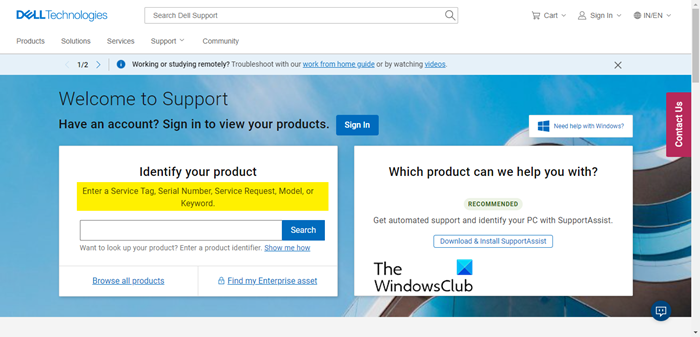
To know the warranty status of a Dell Laptop, you should first go to www.dell.com/support.
You need to enter your Service Tag, Serial Number, Service Request, Model, or Keyword. Click on the Search button.
Then it will bring your warranty page; click on View Warrant Details to have a detailed look at your warranty status. It’s as easy as it gets.
Read: How to find the Service Tag on Windows laptop
2] How to check Lenovo Laptop warranty status
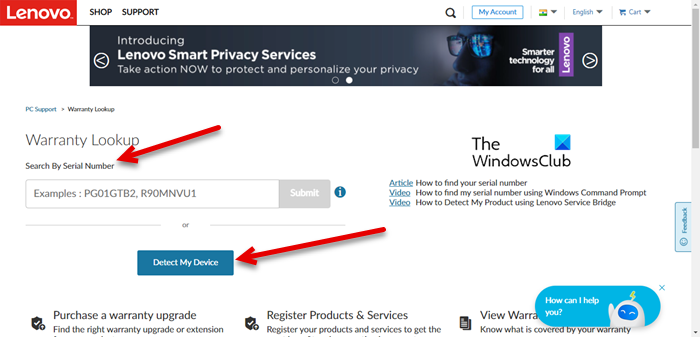
To check the warranty status on a Lenovo laptop, you should visit pcsupport.lenovo.com.
Now, you can either enter the Serial Number, if you have that or click on Detect My Detect. The latter needs you to have Lenovo Service Bridge (which usually comes preinstalled with your computer, but if it doesn’t, you will be prompted to download the utility) as it will scan your device for serial number and pull out your warranty status, this may take some time, so, wait for the process to complete.
Read: How to locate or find Model Name or Serial Number of Windows computer
3] How to check HP Laptop warranty status
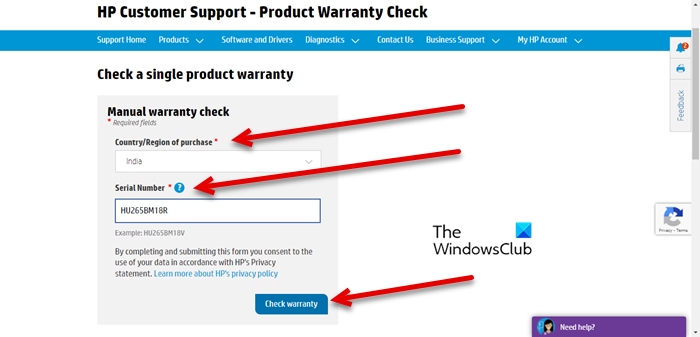
HP, or Hewlett-Packard, makes it easier for users to find the warranty status. You have to visit support.hp.com to do the same.
Navigate to the site, select the Country/Region of Purchase from the drop-down menu, then enter your Serial Number, and click on the Check warranty button. Wait for the process to complete, and you will see your warranty status.
You can also check the warranty of multiple HP devices. Go back to the main screen and click on Continue from Check multiple warranties. Then select Region and enter Serial Number for every device. Finally, click Submit. Your information will be processed and warranty details will be displayed.
Read: How to check up Hard Disk Health using WMIC
4] How to check Acer Laptop warranty status
To know your Acer laptop’s warranty details, you need to visit service.acer.com.
Then, from the drop-down menu, select your country. Make sure to select the country in which you bought your device, not the one you are currently in. Now, enter the Serial Number or SNID and click GET INFORMATION. It will look into Acer’s database and show your warranty details.
Read: When did I buy my laptop? How to find the purchase date?
5] How to check Sony Laptop warranty status
For Sony users, knowing the warranty status is as easy as any other device on this list. First of all, visit sony.com.
You will be redirected to the warranty page. Then select the Model Name and enter the Serial Number. This information can be found on the device itself or from the paperwork that you got with the device. After entering the correct information, just click on the Check button. You have to wait for a few seconds and your warranty details will be displayed.
Read: Precautions to take before sending your PC or Laptop for repair
6] How to check Asus Laptop warranty status
To check the warranty status of Asus laptops, go to asus.com.
Then, enter your Serial Number. You can easily find the serial number from the warranty card or the product box, and it will be written after the letters SN. After typing the Serial Number, click Submit. Your warranty status will be displayed.
Hopefully, you can find your laptop’s warranty status.
Read: How to locate or find Model Name or Serial Number of Windows computer
How long is a laptop warranty?
Usually, a laptop warranty is for a year. However, some manufacturers tend to extend the normal warranty period. You should contact your retailer to know more about your warranty period. If you have been using your product for a long time and are unsure of your warranty status, please refer to the guide above.
What is not covered in laptop warranty?
The terms and conditions for a warranty vary by laptop brand. Usually, damage to the laptop by the user or during a repair by an unauthorized person voids the laptop’s warranty. Additionally, damage to the laptop or its internal components resulting from natural disasters, power failures, or other unforeseen events is not covered under the standard warranty. You can read the complete details on the official website of your laptop manufacturer.
Read next: Laptop vs Desktop – Which is better? Differences discussed.
