
If you are not getting Feature updates, but other updates are available on your Windows 11/10 computer, this guide will help you fix the issue. You might get an error message saying ERROR_SERVICE_NOT_ACTIVE – # The service has not been started, along with an error code called 0x80070426.
According to the official documentation, the primary reason for this error is the HTTP/Proxy settings on your computer. In simple words, if the proxy is not set at the WinHTTP level and instead it is set at the Internet Explorer or User level, there is a chance of getting this aforementioned error.
That being said, in order to troubleshoot the above-mentioned error, you need to configure the proxy in WinHTTP. It is pretty easy and not very time-consuming as well.
Feature Updates are not offered while other Windows Updates are
If Features Updates are not offered (0x80070426) while other Windows Updates are available, follow these steps:
- Press Win+X to open the WinX menu.
- Select Windows Terminal (Admin) option.
- Click the Yes button.
- Open the Command Prompt instance.
- Enter this command: netsh winhttp set proxy ProxyServerName:PortNumber
- Restart your computer.
To learn more about these steps, continue reading.
First, you need to open the Command Prompt or the Command Prompt instance in Windows Terminal with administrator permissions. In this example, we are going to use the Windows Terminal, but you can do the same with the standalone Command Prompt.
To get started, press Win+X to open the WinX menu and select the Windows Terminal (Admin) option. Then, click the Yes button in the UAC prompt to open the Windows Terminal as administrator.
If Windows Terminal opens the Command Prompt instance, there is nothing to do. However, if Windows Terminal opens the PowerShell instance, you need to switch to Command Prompt mode.
Following that, enter this command:
netsh winhttp set proxy ProxyServerName:PortNumber
Don’t forget to replace the ProxyServerName and PortNumber with the correct details.
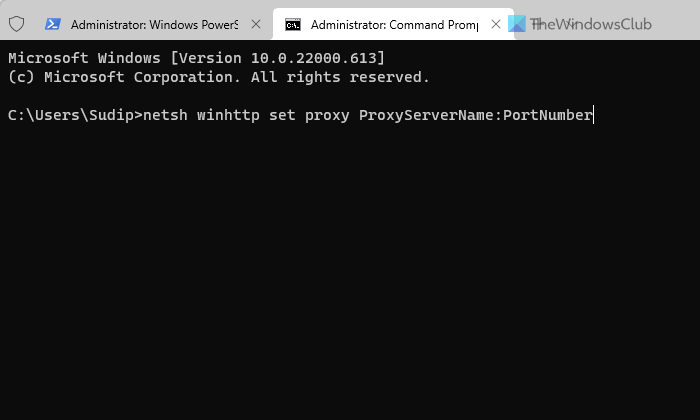
Once done, close the Windows Terminal, restart your computer, and check if it resolves the issue or not.
What are Windows Feature Updates?
Windows Feature Updates are updates that bring new features, UI improvements, and new options. On the other hand, security patches and other updates are for fixing different bugs and glitches. For your information, Feature Updates are comparatively bigger in size than other updates.
Read: Fix Error 0x80070426 for Microsoft Store and Windows Update,
