
Google has been pretty prompt when it comes to adding new features to Gmail, the email client.Gmail is arguably one of the largest email service providers globally. In the recent past having a Gmail personal ID has sort of become mandatory thanks to the other Google services and third-party apps that require Gmail credentials to log in. Nudge is the latest feature to arrive in Gmail, and in this segment, we will explain how to enable Nudge and utilize it.
Tired of sorting through thousands of unimportant email? Gmail’s Nudge feature is here to help you decide which email is important and which is not. Nudge is backed by an intelligent algorithm that detects the content of an email and segregates it into important and unimportant ones.
How to enable and use Nudge on Gmail
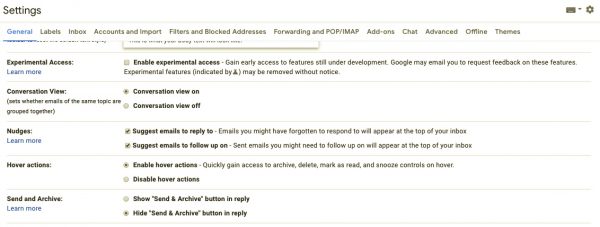
Before we begin, make sure that you have switched on to the new Gmail design. The Nudge feature is only available as part of the latest design update.
Open Gmail and now click on the Cog or the Settings menu. Head over to the General tab and scroll down. Here you should be able to see an option called ‘Nudges.’
There are two options that can be toggled on. The first one reads as follows “Suggest emails to reply to” and the next one says “Suggest emails to follow up on.”
You can enable either one or both, depending on your preferences.
Please note that the Nudge option differs from “Smart Compose.”
What does Nudge do?
Nudge helps you by reminding you about emails that have slipped through. Thanks to the ton of spam and notifications, it is very easy to miss an important email on Gmail. Now in case you have not replied to an important email, Nudge will remind you to do so by beaming a notification. Behind the scenes, Google has deployed a smart algorithm that detects whether an email is important or not. Well, in some cases Nudge does raise a false alarm, but otherwise, I found the feature to be pretty reliable.
I can rely on the Nudge feature without setting up additional Spam filters or rules for the Inbox. Meanwhile, the person on the other end can also nudge you for a reply.
The downside is that the Nudge can potentially irritate the users. For example, if you have nudged your colleague, the chances are that Gmail has already sent them a Nudge alert once and yours is the second time. Meanwhile, Nudge has a nasty habit of reminding me of emails that I don’t want to reply or have already taken care in one form or other.
