
Using a mouse or keyboard in the wrong posture or excessive usage can result in a lot of health issues, including strain, carpal tunnel syndrome, and more. In this post, I will show you how to eliminate those clicks using the Clickless Mouse software. It can emulate mouse clicks using movements instead of actual clicks.
Clickless Mouse for Windows PC
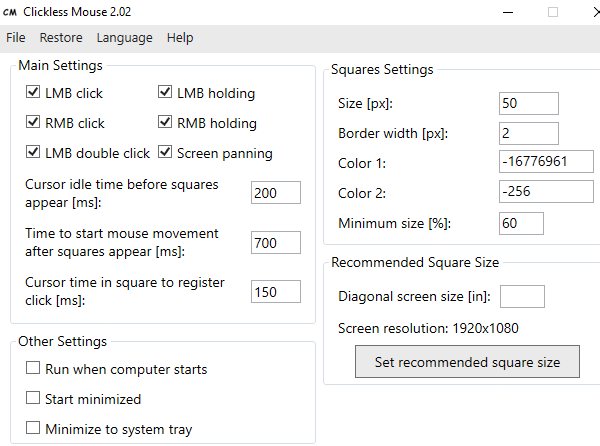
The Clickless Mouse makes using a computer easier for individuals with repetitive strain injuries, carpal tunnel syndrome, certain motor disabilities, and other related health conditions. This application allows you to use a mouse without clicking – simply by moving it.
This free software creates small boxes when you hover your mouse over anything. Each of these boxes creates an action for a mouse movement. It simulates left/right mouse click, double left mouse click, and left/right mouse button holding. All you need is to move your mouse over the right box, and it executes the mouse clicks.
The best part of the software is that it benefits people with motor disabilities and other similar issues. Reducing the movement of your fingers can also help relieve the strain.
Here is how to set up Clickless Mouse:
- Download the software from Github, and install it.
- Once installed, launch the program and then configure the mouse clicks.
- You should see a new square box appear as you check the box.
- Check and uncheck the box to clearly remember which box simulates what type of mouse click.
- Apply the changes and ensure it remains running in the background. If you plan to use it for long, enable it to launch with Windows.
You can also configure other settings, which include Size, Border, Color and minimum size of the squares. If you are not sure, you can input the screen size, and it will set the value accordingly.
Which mouse click does each square emulate?
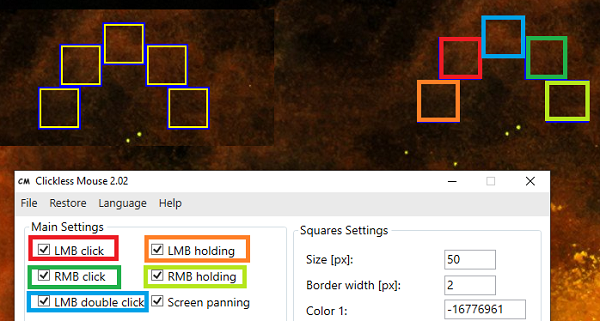
That said, I used it for a couple of minutes, and it’s all about getting used to this sort of gesture. However, once you are through, you’ll love the experience. Initially, I made a lot of accidental clicks, but it slowly grew on me. This is how it works:
When you want to click or hold a mouse button, stop moving the mouse. Wait for the squares to appear and move the mouse cursor to the chosen square. The image explains which square means which box:
Overall, it’s excellent software and should help those who have issues with excessive clicking. A small mouse movement in the right direction, and you are done with it.
