
We are pleased to release Windows Access Panel for Windows x86, and x64. While you can use Control Panel to change settings that control nearly everything about how Windows looks and works, in some cases to access these very controls or the in-built Windows programs, it requires you to engage in multiple clicks or know their names.
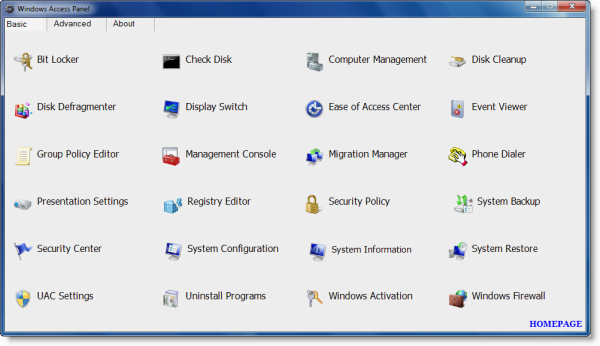
Windows Access Panel
Windows Access Panel v 1.0 is meant to minimize your trouble in accessing such programs. It has been tested on Windows 8, Windows 7 & Windows Vista – but works on Windows 10 too. It can simply be downloaded and used as a portable application. Place it in your Programs Files and Pin its shortcut to your Start menu and you are all set to a faster way of accessing the “hidden” Windows system utilities.
For instance, WAP will save you a couple of clicks if you want to open any program, like maybe the Disk Defragmentation utility. Or maybe you don’t know that to open the Backup or Restore Usernames & Passwords Wizard you need to type credwiz in the start search and hit Enter! 48 such programs have been included in WAP v 1.0.
With this program, you have all, or at least most of such programs at your fingertips. The present download works for 32-bit as well as the 64-bit version.

Windows Access Panel has been designed by Ritesh Kawadkar for The Windows Club. Once you have downloaded the zip file and extracted its contents, please change file extension of Windows Access Panel.chn from .chn to .exe before using it. Some security software may report it as being suspect. Rest assured that it is a false positive. If your antivirus software flags it as suspect, you may need to add it to its Ignore, Exclusions, or safe list.
It works on Windows 11/10 too.
To a novice, this program will expose him to the many Windows utilities & programs he probably never knew existed on his PC! For a geek, this program hopes to help him access all such, from a convenient single place, easily.
