
To improve security Microsoft Office prevents some previous versions of Microsoft Office file types should from being opened, without the help of Protected View in Trust Center. Microsoft Office comes with a security feature called the Protected View feature. Trust Center contains security & privacy settings, which help keep your computer secure & safe. This feature ensures that files downloaded or directly opened do not deliver any malware or steal data. The File Block feature in Microsoft Office prevents outdated file types from opening and can cause your file to open in Protected View via Trust Center.
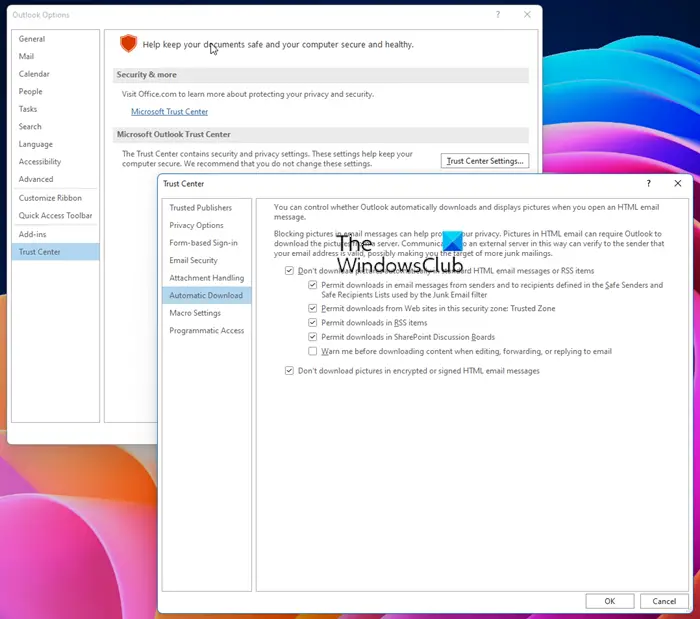
Microsoft Office Trust Center
Files from the Internet and from other potentially unsafe locations can contain viruses, worms, or other kinds of malware, which can harm your computer.

The Protected View feature prevents files downloaded or directly opened from delivering malware. Which files to block or not – these settings can be configured via the Trust Center.
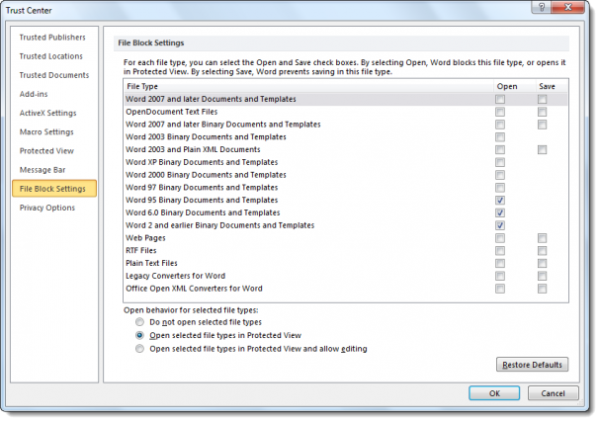
For each file type, you can select the Open & save checkboxes. By selecting Open, the document blocks this file type or opens it in Protected View. By selecting Save, the document is prevented from being saved in this file type.
If you try to open or save a blocked file, you can receive an error message like:
You are attempting to open or save a file that is blocked by your registry policy setting or File Block settings in the Trust Center.
Protected View in Office
To help protect your computer, files from these potentially unsafe locations are opened in Protected View.
By using Protected View, you can read a file and inspect its contents while reducing the risks that can occur.
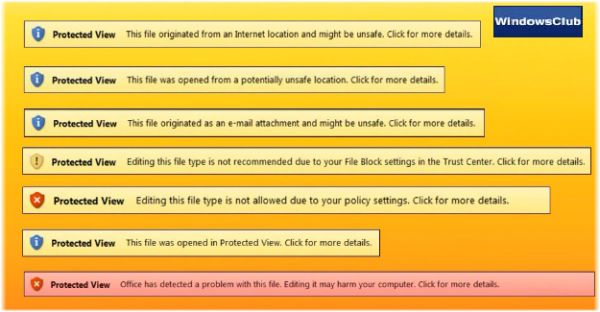
The messages you see could be:
- This file originated from an Internet location and might be unsafe
- This file originated as an e-mail attachment and might be unsafe
- This file was opened from a potentially unsafe location
- This file was opened in Protected View
- The Office has detected a problem with this file. Editing it may harm your computer
- Editing this file type is not allowed due to your policy settings
- Editing this file is not recommended due to your File Block settings.
When you see the Protected View Message Bar, decide how you want to proceed. This should depend on the color and the type of message you receive.
- If you know the file is from a reliable source, click Enable Editing.
- If you are unsure, Protected View lets you look over the file while turning off some functions like edit or print, which can trigger a virus to run. This allows you to read the file without potentially damaging your computer or network.
If you wish to disable Protected View, you can do so from the Trust Center.
File Block feature in Trust Center
File Block prevents outdated file types from opening and can cause your file to open in Protected View. The code used to open and save these older formats have vulnerabilities that hackers can exploit. Thus, they present security risks that should be avoided, if possible. The system administrator makes File Block settings if you work in an organization.
File Block helps with the following:
- Encourage similar Office file types that are used in your organization
- Lower security threats that target older Office file types
- Blocked file types that open in Protected View in Office by default
Examples of blocked, previous versions of Office programs are:
- Word 95 documents and templates
- Word 6.0 documents and templates
- Word 2.0, and earlier, documents and templates
- Excel 4.0 workbooks and spreadsheets
- Excel 3.0 and 2.0 spreadsheets
- Excel 4.0, 3.0, and 2.0 macro sheets and add-in files.
You can read our post on how to change File Block settings in Microsoft Office programs.
The file was opened from someone else’s OneDrive storage
When you open a document on OneDrive that you don’t own, then you will receive this message. The full message goes as Be careful – This file is from someone else’s OneDrive. Unless you trust this person and want to continue collaborating with them, it is safer to stay in Protected View. It protects your PC from, documents that you don’t own and is shared with you online. Once you click on the Trust Documents From This Person option, the warning will be removed.
How to fix File validation failure?
When you see a message in Protected View that says “Office has detected a problem with this file. Editing it may harm your computer. Click for more details, then it’s because there is a security issue that will result in problems. So it’s best to get another copy and from a trusted source.
Read: Microsoft Trust Center helps you manage Security, Privacy, & Compliance.
