
Windows Live Mail is a popular web mail client. You can if you wish, you can customize your mail, which you send out. To pep up your mail, you can, if you wish, you can have a background image, as stationery in your Windows Live Mail.
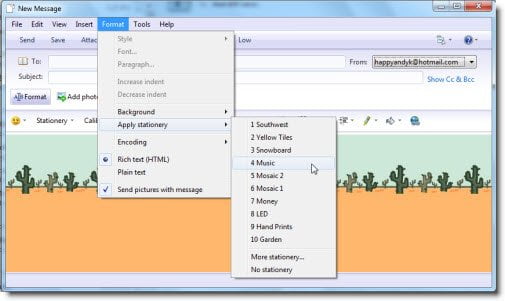
Use Stationery in Windows Live Mail
To use Stationery in Windows Live Mail, open Windows Live Mail > New Message > Format > Apply Stationery > Select Stationery.
Make sure that you have checked the Rich (HTML) formatting option checked.
If you have downloaded and saved stationery in other locations, you can also select More Stationery from these locations.
We trust you will like this small tip which will help make your outgoing mail look smarter.
Do note that Windows Live Mail 2011 does not support this.

