
iReboot will help you switch between Windows operating systems. It is a free reboot helper tool for Windows 10, that lets you choose which operating system you want to directly reboot into, on restart.
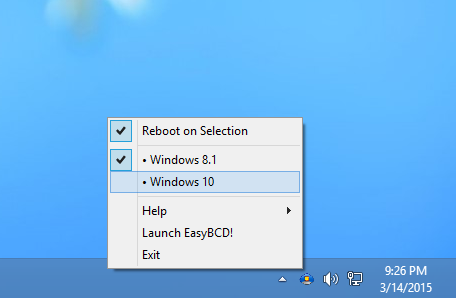
If you have installed two or more copies or versions of an operating system on your computer, and if you want to reboot into another OS from your current one, you normally follow the following procedure. Press restart, wait for Windows to shut down, wait for your BIOS to post, then finally select the operating system you want to boot into within the bootloader time limit.
Reboot directly into another Operating System
iReboot from NeoSmart is a simple yet effective reboot helper tool. iReboot sits in your taskbar at startup, taking up only 400KB of memory and lets you choose which operating system you want to reboot into. You just select the OS entry from it and let it do the rest!
You can also use iReboot to set up complicated recovery scenarios where the boot menu timeout is set to 0, but additional recovery and repair utilities are available from the iReboot menu.
You can visit its home page and click on the Limited, free download for non-commercial use link to download the free version or click here to download it directly.
Quite a handy app if you switch your Windows frequently from say, Windows 10 to Windows 7 and vice versa.
Read: How to hide Notification Area & System Clock in Windows.

