
Windows 10 makes managing passwords in Internet Explorer 11 easy. It does so by automatically letting you store and retrieve passwords for all the websites and applications you use – and that too in a secure manner. If you wish to manage your passwords in Internet Explorer, you can do so as follows:
Manage passwords in Internet Explorer
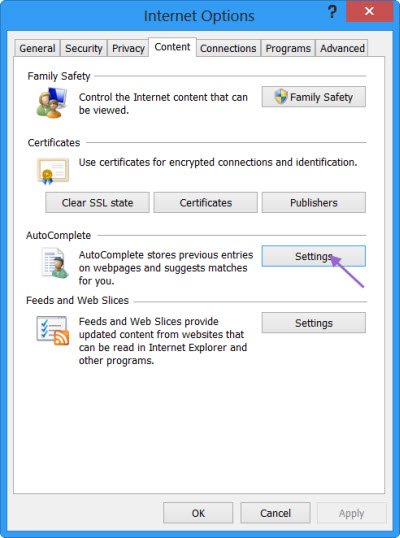
Open Internet Explorer > Internet Options > Content tab. Under AutoComplete, click on Settings.
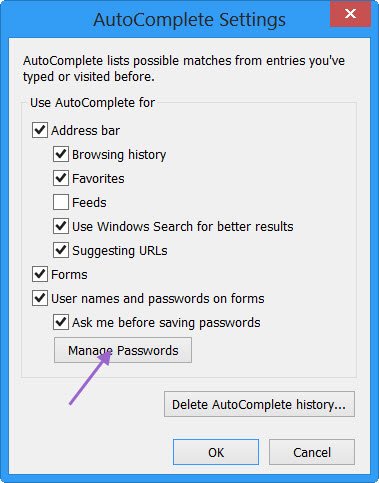
In the AutoComplete Settings box, click on Manage Passwords.
This will open the Windows Credential Manager. The Credential Manager helps you store credentials such as user names and passwords in a single, convenient place. These credentials, which you use to sign in to websites or other PCs on a network, are saved in special folders on your PC. Windows can securely access these folders and use your stored credentials to automatically sign you into websites or other PCs.
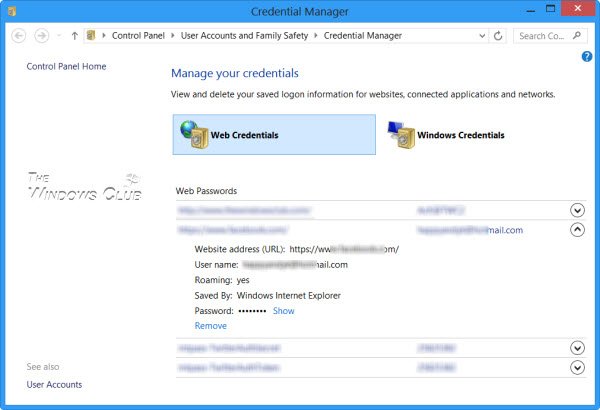
Web Credentials in Credential Manager
In Windows 10/8, the Credential Manager stores one more type of credential, called as the Web Credentials, apart from the Windows Credentials, called Windows Vault.
Web Credentials helps Internet Explorer to store your web passwords securely. The Credential Manager manages your credentials using the Credential Locker service, which creates and maintains a secure storage area on the local computer that stores user names and passwords the user saved from websites and Windows apps.
In the Credential Manager, under Web Credentials, you will be able to see all your stored web passwords.
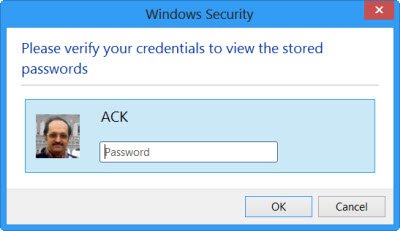
To see the passwords behind the asterisks mark, you can click on Show. Windows will ask you for your login password to verify your identity.
Once done, the password will be exposed. If you want, you can also remove the stored password/s by clicking on Remove.
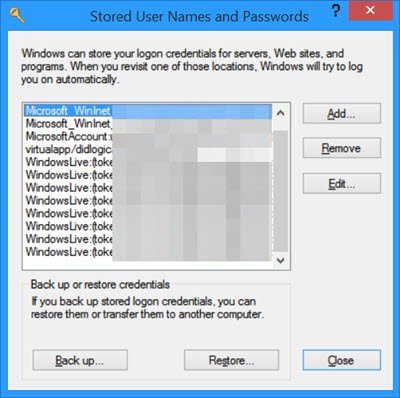
Read: How to manage Stored User Names and Passwords.
While you can add, backup, restore Windows Credentials, there is no way to add or edit Web Credentials. Microsoft recently enumerated the changes it incorporated in Password Policy and Autocomplete Forms in Internet Explorer, to reduce the confusion in users about their passwords being recalled on one site but not another. Check this post to see how Internet Explorer 11 now stores Passwords.
Go here if your Credential Manager is not working properly in Windows and here if you are looking for free password managers for Windows.

