
You can now change the Windows login UI screen with or without the use of third-party software or hacks. Windows now supports the ability to load images into the login screen’s background. Although this functionality was designed with OEMs in mind, it is pretty easy to turn on and off using Regedit and some images lying around your hard drive. This post will show how you can change the Windows Login Screen.
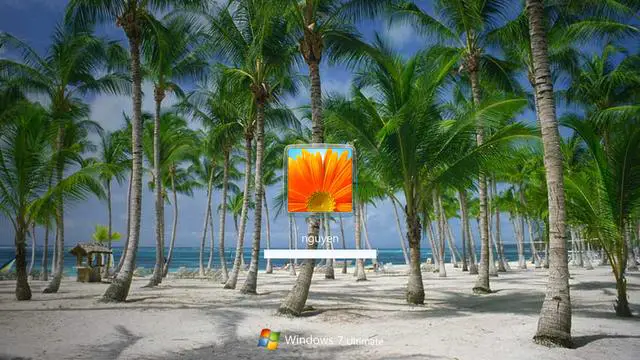
How to change the Windows OEM Login Screen
First, a check is made to determine if the customization functionality is enabled or not. More precisely, a DWORD value named OEMBackground in the following registry key is checked.
- Open Registry Editor and then navigate to the following path
HKLM\Software\Microsoft\Windows\CurrentVersion\Authentication\LogonUI\Background
- Its data defines whether or not this behavior is turned on, i.e., 1 for enabled, 0 for disabled. Double click on OEMBackground DWORD to see its value.
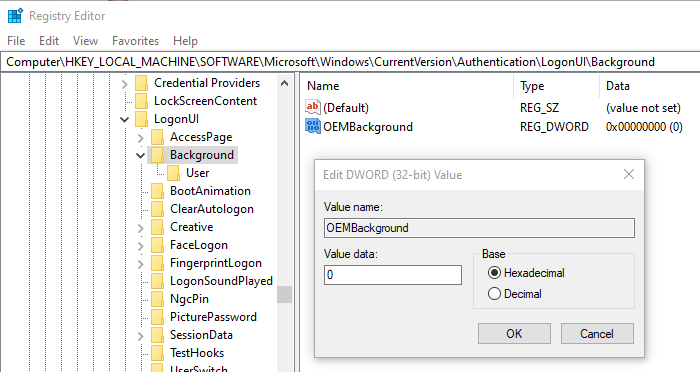
However, it is possible that value may not exist by default, depending on your system. As this is OEM feature images are derived from windir%\system32\oobe\info\backgrounds. Like the registry value, this folder may not exist by default.
Free tools to change login UI screen in Windows
1] Logon Changer: This utility lets you change the Windows 7 logon screen background. It provides an easy way to customize the logon screen background with just a few clicks. Simply download the free application, run it, and click Change Logon Screen.
2] LogonUI Background Changer is a small tool from Codeplex, which can help you to change the LogonUI background image in Windows 7, by modifying the Registry.
3] This Windows Logon Changer Tool will allow you to customize the logon screen for Windows 7 without touching the Registry at all.
4] This Windows Background Changer is WPF-based. It’s a nice technical demo of Windows Presentation Foundation capabilities for those interested in WPF. The 3D animations require a decent GPU to run smoothly. It runs fine with my Radeon HD 3200 on my laptop computer, but it should also work with lower-end graphic cards, albeit slowly.
5] Windows Logon Screen Rotator is a free application that will change the logon background image to an image of your choosing and also at a time you select. Current options include each day, each logon, and each computer lock.
6] Windows Logon screen editor, is a tool developed by Deviantart user which can quickly set your wallpaper as the logon screen background.
7] Thoosje Windows Logon Editor also comes with a library of free login screens backgrounds, Like high windows 3D logos and various other Themes like Movie, Cars, and many more.
8] Windows Login Changer lets you add a collection of pictures and change them at a specified interval. The supported image formats are Bitmap (BMP), Portable Network Graphics (PNG), Joint Photographic Experts Group (JPG), and Graphics Interchange Format (GIF).
9] Logon Screen Utility needs installation and integrates itself with the Windows desktop right-click context menu.
That’s it.
How do I always use custom logon background?
To always use a custom logon background, open your Group Policy Management Console. Please create a new GPO and link it to the relevant computers. Navigate to Computer Configuration → Administrative Templates → System → Logon. Enable the “Always use custom logon background” setting, ensuring your desired background appears consistently.
How to change startup background in Windows 11?
To change the startup background in Windows 11, go to Settings > Personalization > Lock Screen. Here, you can choose a background under “Background,” selecting either Picture, Windows spotlight, or a specific image from your files. This will update the startup background when you boot up your computer.
