
How to apply old Windows 98 Plus! themes in Windows 7

Want to go retro? Try applying the old Windows 98 Plus! themes to Windows 7. Yes they do work and you can apply them easily!
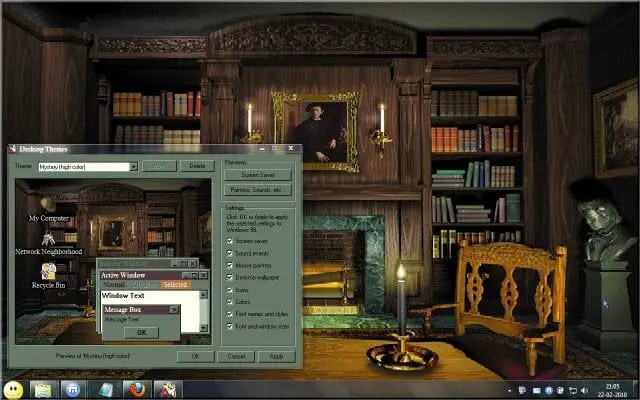
windows98 windows7 How to apply old Windows 98 Plus! themes in Windows 7

Extract the contents of the downloaded .zip file to your desktop. Move its content, the Plus! folder on to the desktop.

Open the folder, right click on THEMES.exe and select Properties.

Click on the Compatibility tab and in Compatibility mode section, check Run this program in compatibility mode.

From the drop down menu, select Windows 98.

Click Apply > OK.

Now click open Themes.exe and from its drop down menu select the theme you want to apply.

Thats it!

You will find that your wallpaper, cursor, font, etc, all have gone retro!

Visit AnsonSterling on DeviantArt | Download Windows 98 Plus! Themes.

If you have liked this post, you might want to check out some more, on topics like .

About AnandK@TWC

Anand aka HappyAndyK is an end-user Windows enthusiast, a Microsoft MVP in Windows Desktop Experience since 2007, and the Admin of TheWindowsClub.com, TheGeeksClub.com & WinVistaClub.com. Creating a System Restore Point before trying out a new software or a tweak is always recommended.
Follow on Google: +AnandK@TWC

Ads

Random Posts

  • http://my-views.net Haresh

    I’ll surely give it a try.

    In my Windows 7 too, I’ve the classic theme (not the 98 one)

  • http://www.stationreporter.net subway-buff

    Does this also work with the Plus for Windows 95 themes and Plus for Windows XP themes? I still have my CDs for Plus 95, Plus 98 and Plus XP

  • http://www.thewindowsclub.com/ Windows Club

    ^ I have no idea, but if you do find that it works, we shall be happy if you share it here for the benefit of others.

  • Paulo

    Man I think this won’t work very well on 64 bit based systems, I get everything working but the wallpaper and the screensaver :(

  • Devin

    don’t work the fonts icons and everything else won’t change

  • http://www.2blogtips.net FERB WL

    I like to use basic to help better computer and hope everyone use it , too, thanks a lot.

© 2012 The Windows Club All Rights Reserved