
Let’s say you have a Hyper-V guest operating system that is running Windows Server or Windows 11/10, and it has a disk that is connected to a SCSI controller. Now, if you receive an error Unexpected failure. Error code: 490@01010004, then this article may help you.
Unexpected failure, Error code 490@01010004
You might see this error message in the Event Viewer.
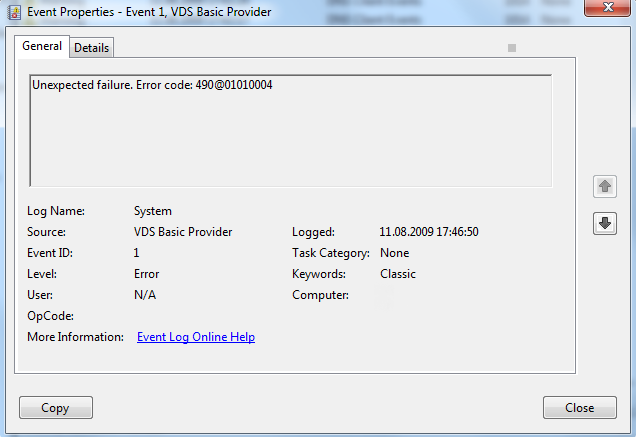
There is a KB979391 that ONLY explains why this happens, but no actual fix is mentioned in that article. It’s been reported in a few forums, that issue can be resolved by reinstalling your Virtual drive software like Alcohol 120%, DAEMON Tools Lite, etc.
One thing you have to remember is after you remove the software, there is a good chance that it may leave the SPTD.sys driver behind. This driver is notorious on Windows 7 for causing frequent crashes including the Blue Screens.
There is an uninstaller tool that’s available that will help you in removing it. Download the application from here. Run the application, then click on Uninstall to remove it.
Reboot your computer to take effect.
Alternatively, you can go to use the registry method to disable it:
Go to Start under search type in Regedit
Then go to:
HKEY_LOCAL_MACHINE\System\CurrentControlSet\ Services\sptd
In the right-side panel, you’ll have to set the DWORD Start value to 4 and reboot the machine once.
I hope this helps someone.


Thanks a lot for this was very helpful indeed. I had installed the Virtual Clone Drive app.
For the record, I have Virtual Clone Drive as well. I just posted on the Slysoft/Virtual Clone Drive sub-forum.
I have had same error message on a Windows 2008 R2 Server Host with Virtual Clone Drive installed. The driver was in a different service HKEY_LOCAL_MACHINESystemCurrentControlSetServicesVClone
thanks … since last two days , my pc was giving a system and used to hang for 1 or two minutes… searched everywhere and found the solution here :)… in event manager .. it gave me even scary messages of bad blocks on disk…. which finally zeroed in to CloneCD software, which was acting nasty.. removed /Resolved … Thanks a Bunch