
Enable hidden Aero Lite Glass Theme in Windows 8 with Aero Lite Tweaker

A new tweak has been found in Windows 8 DP and Beta. There is an a theme called Aero Lite Glass. Aero Lite theme is expected to be the alternative theme for Windows 8 users with low-end hardware. In short, just as you have the Aero Basic theme in Windows 7, you will have the Aero Lite theme in Windows 8.

aero lite windows 8 400x56 Enable hidden Aero Lite Glass Theme in Windows 8 with Aero Lite Tweaker

WinUnleaked.tk has posted this find today, where they have shown how you can enable the Aero Lite Glass theme.

To do so, navigate to your System32 folder and launch WindowsAnytimeUpgradeResults.exe. Thats it. Your Windows 8 will now display the Aero Lite Glass theme.

Windows 8 Aero Lite Tweaker
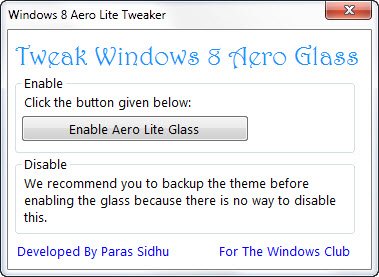
aero lite tweaker Enable hidden Aero Lite Glass Theme in Windows 8 with Aero Lite Tweaker

Our developer Paras Sidhu has also developed a small app Windows 8 Aero Lite Tweaker that will let you quickly enable Aero Lite Glass theme.

download1 Enable hidden Aero Lite Glass Theme in Windows 8 with Aero Lite Tweaker

Windows 8 is still in the developmental stage and some features are sure to change till the time its final Windows 8 RTM version is released.

softpedia Enable hidden Aero Lite Glass Theme in Windows 8 with Aero Lite Tweaker

We recommend that you backup the original theme before enabling the Aero Lite theme as there currently appears to be no way of reversing the changes.

If you have liked this post, you might want to check out some more, on topics like , , .

About AnandK@TWC

Anand aka HappyAndyK is an end-user Windows enthusiast, a Microsoft MVP in Windows Desktop Experience since 2007, and the Admin of TheWindowsClub.com, TheGeeksClub.com & WinVistaClub.com. Creating a System Restore Point before trying out a new software or a tweak is always recommended.
Follow on Google: +AnandK@TWC

Ads

Random Posts

  • Dreamcaster23

    The WindowsAnytimeUpgradeResults.exe trick didn’t work at all for me, Just said my Upgrade was complete.

  • irfan Güllü

    Thanks for the share

  • Erick Paluan

    It’s the same with me

  • http://www.facebook.com/people/Daniel-Watkins/629637578 Daniel Watkins

    Is it possible to disable Aero completely on windows 8?
    What about making windows 8′s explorer to look like windows 7?

© 2012 The Windows Club All Rights Reserved