
Email Spoofing is a type of phishing. We all know about Phishing, how it works and how to avoid phishing. Essentially, they are cybercriminals who set up various types of lures with the intention of extracting valuable information from you. In most cases, they want your information about the financial institutions where you may have accounts – banking institutions, card companies, PayPal, etc. They employ various techniques to make it appear as genuine emails and messages.
What is Email Spoofing
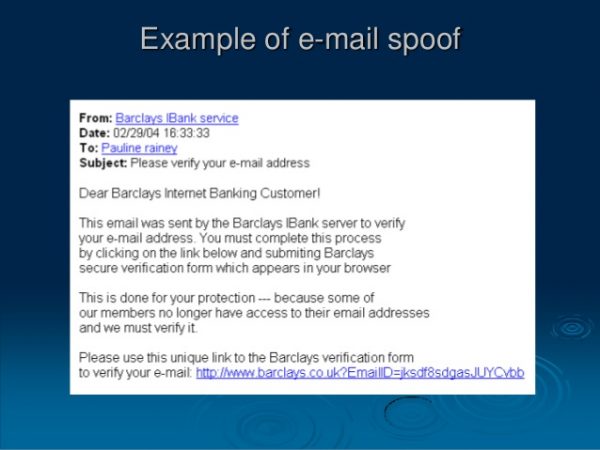
As the name suggests, cybercriminals spoof emails in a way that they appear to be originating from someone you trust. What is email spoofing? One can define email snooping as the method where cybercriminals ‘use’ others’ valid email IDs to send you phishing emails and messages.
For example, you may receive an email from a financial institution, such as PayPal or your bank. There won’t be anything suspicious in the email as the email ID is related to PayPal. The only difference you might find in spoofed emails is that they are asking you for your personal and/or financial information. It might simply say ‘Update your information’ and ask you to click on the link in the email.
No matter what, never click on links, even in genuine emails, if they ask you to update your information. Type the URL manually and then proceed accordingly. You never know which email is just a phishing attempt.
How to check for Email Spoofing?
In case you have seen the email account configuration in your email clients, you will see that the outgoing server always contains SMTP (Simple Mail Transfer Protocol). Every user and mail provider on the Internet uses SMTP to send mails. The protocol is, however, exploitable. It is the reason you can’t kill all spam at the entry. The protocol was updated, but does not yet incorporate filters to differentiate between original email headers and tampered headers.
Not to confuse you here, but when you send an email using webmail and email clients, the webmail or clients attach a header to the email so that the recipient webmail and clients know the path it traveled to reach the recipient. These headers can easily be exploited and edited manually.
How to stop Email Spoofing?
If you are wondering how someone can send emails using your email ID, it’s a simple alteration to these headers that allows it to appear as though the email originated from your email ID. Now, if you receive an email from your email ID, you will get curious or worry if the ID is compromised. While it is better to change passwords frequently, in most cases, it may be just email spoofing.
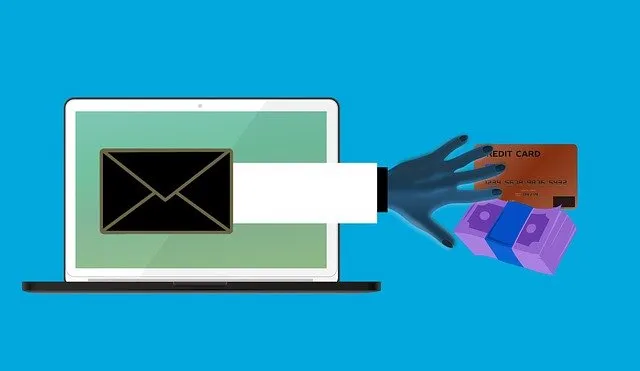
How to protect from email spoofing
Most of the rules to protect yourself from email spoofing are the same as in the case of phishing:
- If the email doesn’t make sense, delete it
- If the email appears to be from your financial institution but requests your password or other sensitive information, contact the financial institution directly and verify if they sent you the email. Likely, they have not.
- No matter what, never click on links in an email to open your bank’s website; always type the URL manually into the browser’s address bar.
While the above are common, the best method to protect from email spoofing is to use digital signatures. Many companies provide email digital signatures, including some that provide it for free. If you send a digitally signed email, the email client at the receivers’ end will analyze the header to search for tampering. If it detects anything suspicious, it will notify you when you attempt to open the email.
In any case, if you get a spoofed email, notify the relevant institution. While notifying the institution, you may also include a CC to “[email protected]” so that the cybercrime cells can also take a look at it.
A safe path to follow: If you receive an email purporting to be from your Bank, Credit Card provider, PayPal or financial institution asking you to click on a link and change something, ignore it.
Can someone spoof an email to yourself?
Yes, someone can spoof an email to appear as if it’s sent from your address to yourself. This technique, known as self-sending spam or email spoofing, involves manipulating email headers to make it appear as though you sent the message, although the actual sender is someone else.
How do I stop a scammer from emailing me?
To stop a scammer from emailing you, mark the email as spam or junk and block the sender. Report the email to your provider by forwarding it to their abuse address, such as [email protected]. Enable email filters to automatically detect and manage potential scams in the future.
TIP: Some of you might want to read about Business Email Compromise here.
