
We are pleased to release Create A Shortcut tool for Windows. Create A Shortcut adds the ability for a user, to select where to create a desktop shortcut for a file system object, from anywhere on a user’s computer.
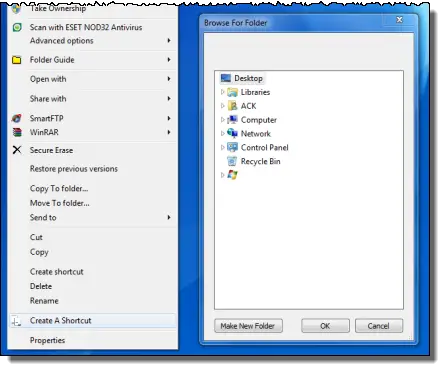
Create A Shortcut Tool for Windows PC
Let us say you have opened C:\Program Files\Quick Restore Maker folder and you want to create a shortcut of this program’s .exe file in D:\Daily Shortcuts folder, you can do so easily in a couple of clicks from the Program folder itself!
Once you have downloaded the setup, run the installer to install it. It will install the program folder in the C:\Program Files folder. It will also create a Control Panel Uninstall entry.
Now just right-click any file or folder whose shortcut you want to create and click Create A Shortcut context menu item and a folder selection dialog will open. Here, select where you’d like to place its shortcut.
Create A Shortcut lets you select a location to place a shortcut without using the default Windows location (SendTo Desktop or Create Shortcut) or creating a shortcut in its own folder first and then moving it.

Create A Shortcut v 1.0 has been created by TWC Member Lee Whittington for The Windows Club, on a request from TWCF member Bamajon197, and has been tested on Windows 7, but works on Windows 11/10/8 too.
